

Two weeks: thirteen releases across four projects, and six Raycast extensions updated. The list is long, but the thing worth reading for is not any single feature — it is what turned up in project after project without being planned. A tool that stops claiming more than it has actually checked.
FinderGit
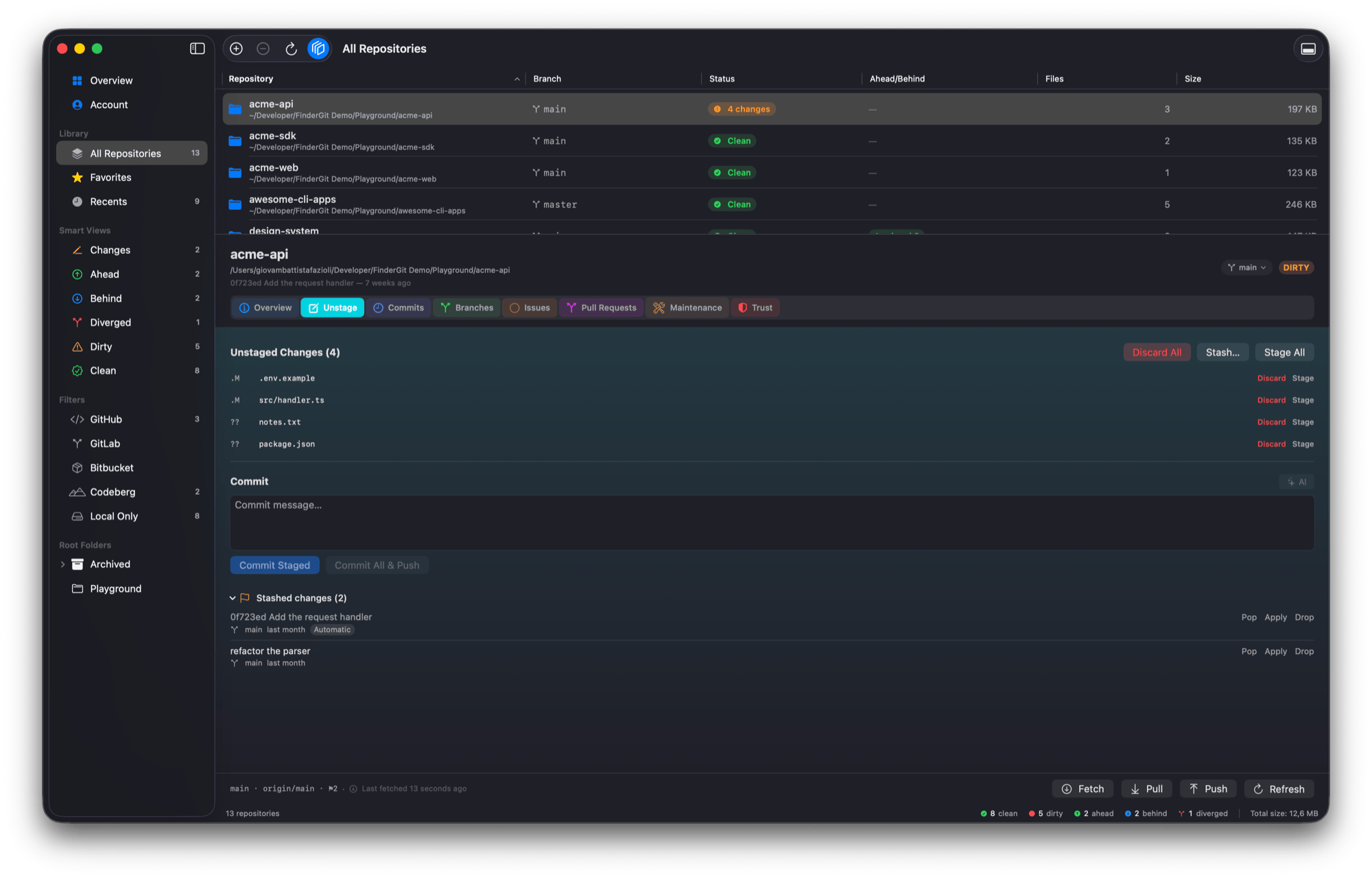
Put the working tree down for a minute (0.28.0). There is a kind of interruption where a commit is the wrong answer — you are not finished, and a commit you would have to undo is worse than none. The Unstage tab now carries a Stash… button beside Stage All and Discard All. Give the stash a message or let git name it after your last commit; untracked files come along, so what you get back is a genuinely clean tree rather than a half-tidied one.
Everything you have set aside is listed under the commit box with the branch it came from and how long it has been waiting — because the stash that matters is the one you forgot about, and “last month, on a branch you have since deleted” is the sentence that tells you what to do with it. Pop, Apply, Drop. A pop that hits a conflict leaves the conflict in your files and the stash still on the list.
And a failed action no longer goes quiet (0.28.0). When a git action failed, the red warning in the action bar could vanish a second or two later — on exactly the actions that had changed something on disk, because re-reading the repository overwrote the message with “nothing wrong here”. The failure now outlives every refresh, which is what “Last action failed” always claimed to mean.
Codeberg, with nothing to set up (0.27.0) — and then the part that did not work (0.27.1). Codeberg answers questions about public repositories without asking who is asking, so FinderGit can simply ask: issues, pull requests, stars, description, topics, latest release, no account and no token. Except in the file browser, where those columns stayed empty and the fork badge never appeared — two checks asked “is this GitHub?” before the new per-host routing ever got a say. Fixed the next day. If you installed 0.27.0 and wondered why the columns were blank on Codeberg: that was this, not your setup.
The same release stopped repositories on GitLab and Bitbucket from borrowing another repository’s numbers. A project mirrored under the same owner and name on two hosts could show counts, issues and pull requests belonging to the other one; those columns now stay empty rather than confidently wrong.
A slow git operation can be stopped (0.26.0). Three seconds in, Fetch, Pull and Push turn into a stop control — and the app tells you what stopping left behind, which is the part that actually matters. A stopped fetch is harmless. A stopped push leaves the remote updated or untouched, never half-way. A stopped pull is the one to know about: if it had started merging you may be left mid-merge, and FinderGit notices and offers Finish and Abort. The three-second delay is deliberate — without it, a double-click on Fetch would cancel the fetch you just started.
Every release page now also publishes the SHA-256 of its DMG, back to 0.4.1. If a virus scanner ever flags a download, “is this really the file that was published?” is a question that should not depend on asking me.
https://findergit.app
Netfox
Is my Wi-Fi the problem? (0.17.0) The Wi-Fi tab always showed you the numbers. It never told you what they meant. Open the network you are connected to and it now answers in a sentence: the link looks fine, the channel is busy, the signal is weak, or both at once — which matters, because a busy channel and a weak signal call for opposite moves and the numbers alone never said which you had.
Behind the verdict: how many networks share your stretch of spectrum, how many of them are close enough in strength to genuinely compete for the channel, and your signal-to-noise ratio. It names a quieter channel when one exists, judged by the width your access point would carry there, and counts an 80 MHz neighbour on channel 36 as the four channels it really occupies.
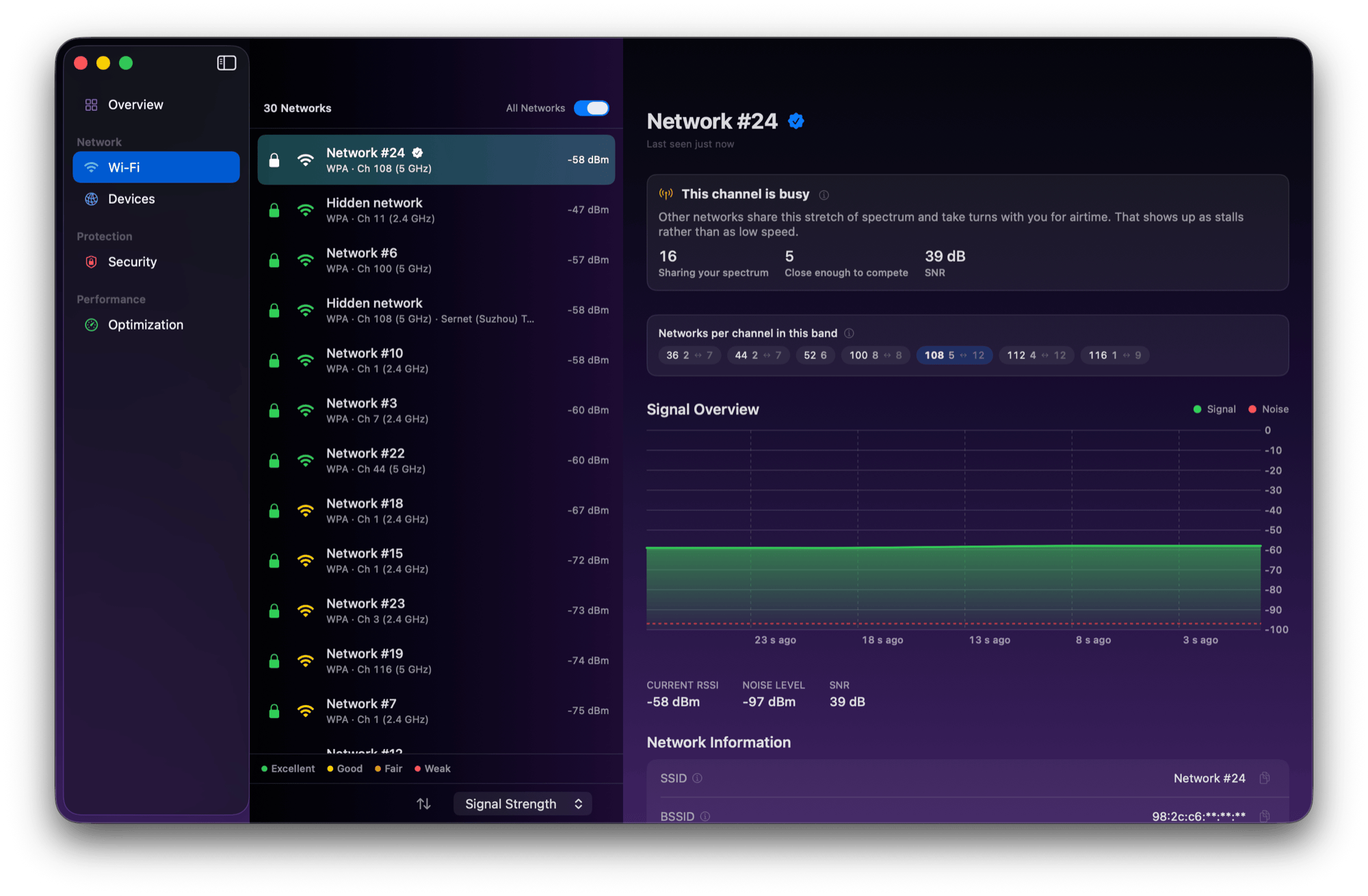
The competing-neighbour threshold is measured rather than chosen: in a real dense environment — 33 access points visible at 5 GHz, median −85 dBm against a −58 dBm link — the count sat flat at 2 all the way out to 15 dB and only then climbed. And where macOS gives no noise reading, the signal half is reported as unknown rather than assumed to be good. Nothing new is probed for any of it; it all comes from the scan the tab already performed.
A hidden network is now explained rather than merely labelled, too. Withholding the name is widely believed to be a security measure and is not one — the devices that already know the network broadcast its name while they look for it.
Free a port, without a terminal (0.17.0). Netfox would show you that something was holding port 3000; the next step was still kill. Each Local Services row now asks that process to quit — politely first, so a dev server can save what it was holding, then offering to force the matter. It asks the whole process family, not just the one that opened the socket, and it re-reads the port immediately before sending anything: PIDs get reused, and a row is a snapshot of a moment that has already passed.
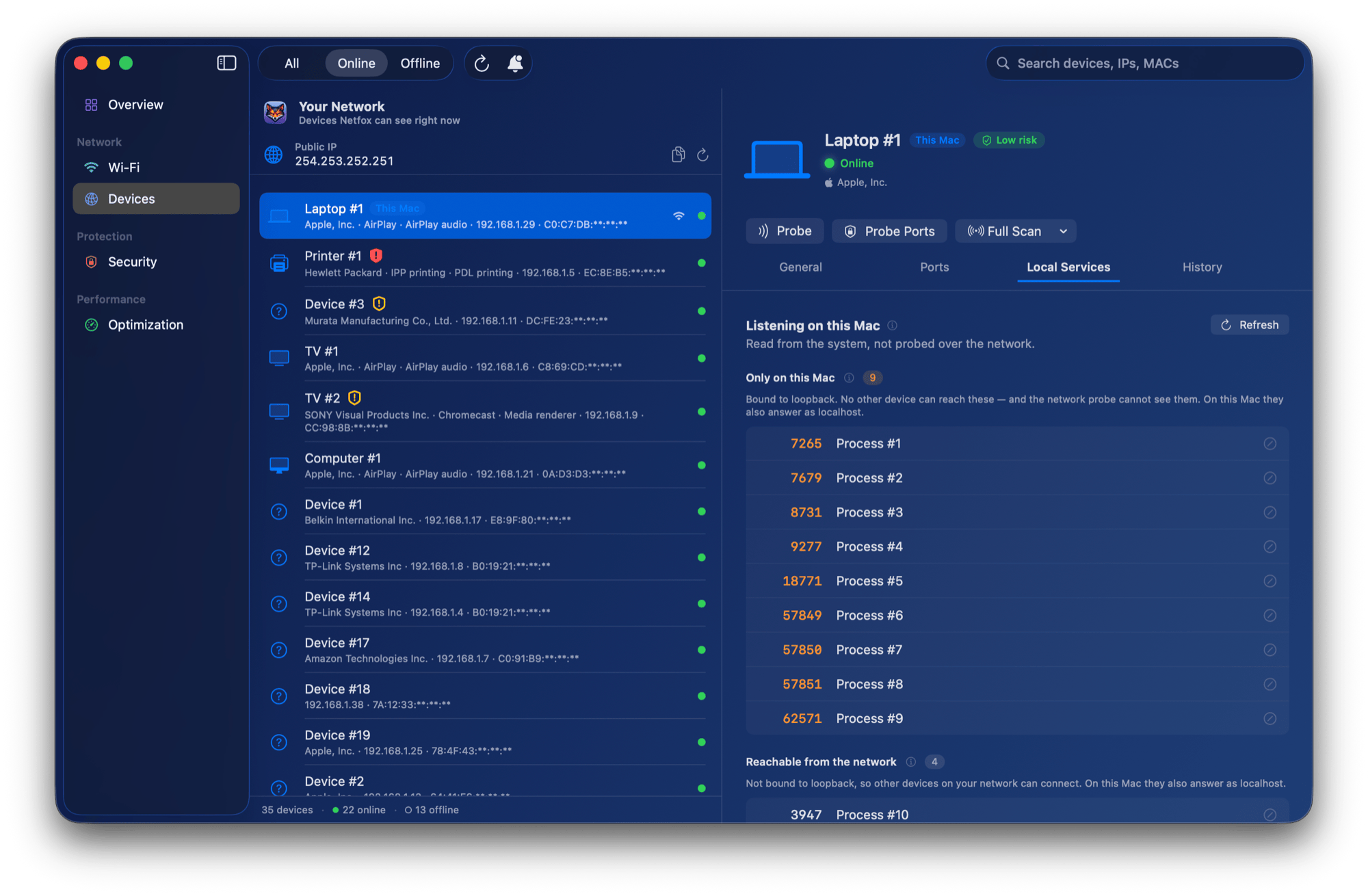
One device, one icon (0.17.1). The same device could carry a different icon in the device list, in its own alerts, in its History window and in the tag editor — and could change between launches with no setting touched. Three separate causes, all closed: a stored category decided by whichever concurrent discovery answered first (a HomePod advertises both an audio and a display service, so “first” was genuinely random), three surfaces reading the raw stored value instead of the one the list shows, and alerts whose snapshots had dropped the model and the advertised services. Some devices also answer “what are you?” with an internal board code; where Netfox recognises the code, the Model row now reads Apple TV instead of a string of letters and digits.
A hosts name belongs to the address, not to each service (0.16.6). One name pointing at 127.0.0.1 reaches everything listening there, so it was printed beside every service — true of all of them, useful for telling apart none. Those names are now stated once, in the group heading.
https://netfox.app
octoscope
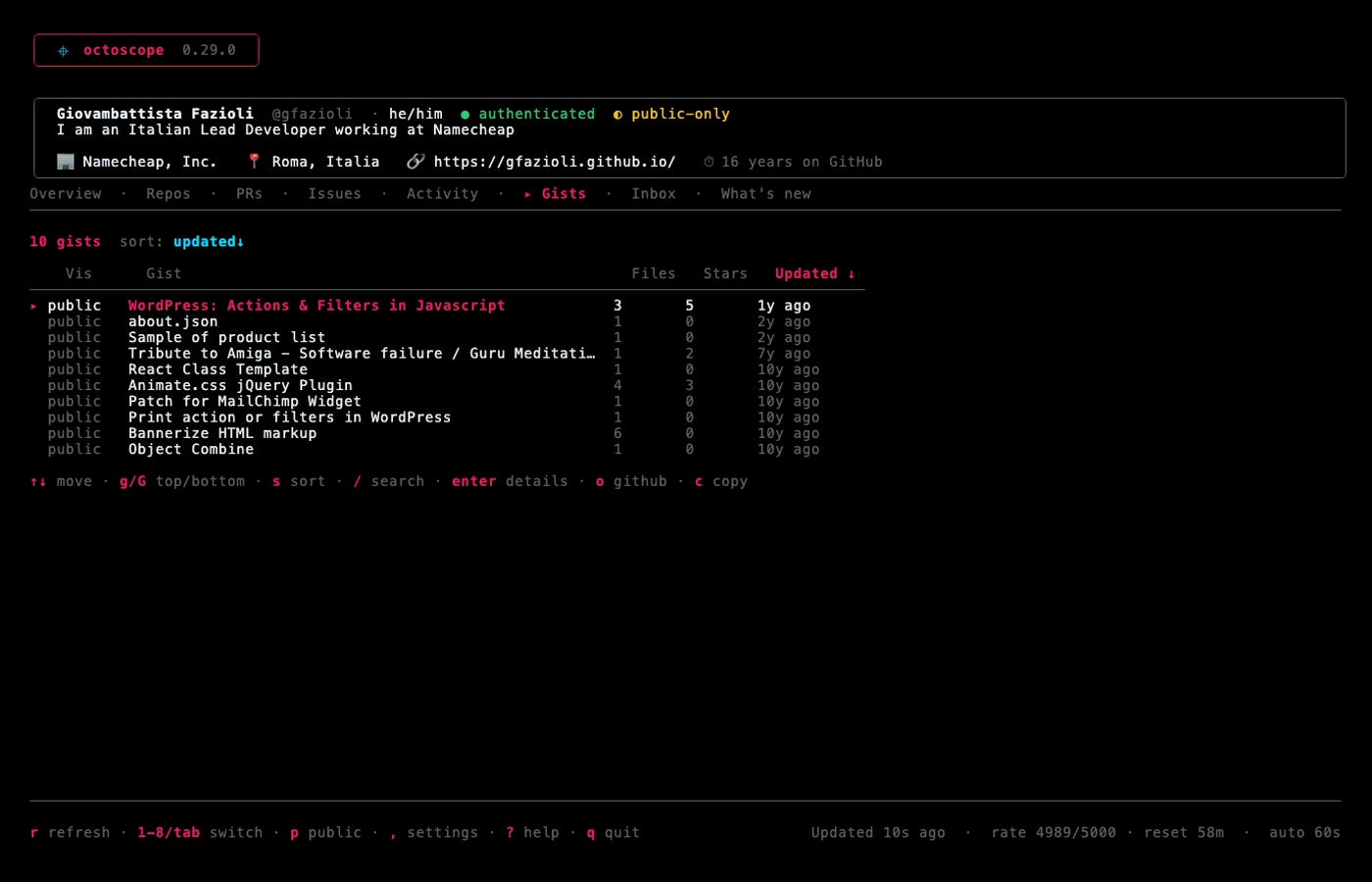
Four things that used to send you to a browser (0.29.0). Gists, with the file contents syntax-highlighted and c copying the code rather than the link. An activity feed beside the contribution heatmap — pushes, pull requests, reviews, issues, releases, branches — because the heatmap answers how much and the feed answers what. Sponsors received and given. And your real GitHub inbox: mentions, review requests, assignments, CI. s cuts the noise, and that key exists because of a measurement rather than a preference: of 104 notifications on a real account, 77 were CI activity.
When it’s GitHub, octoscope says so (0.30.0). octoscope does nothing but talk to GitHub, so when GitHub degrades every symptom — a timeout, an empty tab, a 502, a scan that will not finish — is indistinguishable from octoscope being broken. It now asks GitHub’s own status page and tells you which it is, at the moment you are deciding who to blame. It stays silent while GitHub is healthy, and silent again if the status page itself cannot be reached: it never renders a green “all systems operational”, because that would be a clean bill of health it has not verified.
Three more of exactly that shape shipped in the same release, and all three came from a comment under the 0.27.0 launch — someone who did not ask for features, but found three places where the report said more than it had checked. The scan now states the window it compared against (“compared against a baseline recorded 29 days ago”), including where nothing changed, which is the case that matters most and the one a per-finding note could never reach. A uses: into a repository octoscope did not read is now always disclosed, not only where an outsider could reach the caller. And a file that changes back — A → B → A — is recognised as a return instead of printing a hash nothing remembered.
And the tab that pushed everything off screen (0.30.1). On 0.30.0, opening What’s new carried the banner, the profile card and the tab bar off the top of the terminal, with no way to scroll them back. Reported with a screenshot, which is the only way this kind of defect gets found. Two faults, different in kind: the entry was the longest ever shipped, and the tab had never been able to scroll at all — the only long static surface in octoscope without a viewport. The shorter text alone would not have fixed it, so there is now a test that measures every What’s new entry against a line budget.
https://gfazioli.github.io/octoscope · brew upgrade gfazioli/tap/octoscope
Mantine extensions
mantine-json-tree 3.4.0 — the JSON viewer you can type into. Opt-in editable: click a string or a number for an inline editor, click a boolean and it toggles outright since there is nothing to type. The component stays controlled — it holds no copy of your data — and onChange hands you the new data plus a description of what changed. Writes preserve identity: only the spine down to the target is rebuilt, so a Date, Map, Set, RegExp, BigInt or React element elsewhere in the tree survives an edit unchanged, where a structuredClone would have flattened every one of them. Nodes with no real address — the children of a Map or a Set — can never be edited, whatever you configure. Renaming keys and adding, removing or reordering nodes are deliberately out: they need a different path format, which is a larger piece of work rather than more of this one.
mantine-json-tree 3.3.0 — three ways the tree could hide your data. A circular reference crashed the component and took the whole page with it; repeats now render as [Circular]. Plain data shaped like { type, props } — an everyday shape in form-builder and low-code JSON — was mistaken for a React element and collapsed into <Component />, hiding its entire subtree; elements are now identified by their $$typeof marker alone. And Ctrl/Cmd+C copied the root instead of the focused node, including while you were trying to copy text out of the search field.
mantine-border-animate 3.0.0 — a border that can measure something. variant="draw" with progress draws that share of the real perimeter, corners included, so 50% is exactly half the way around whatever the aspect ratio is. A dash variant whose pattern is expressed in perimeter percentages rather than pixels, so it stays even at any size. A comet beam with a fading tail at constant speed on any shape. And trigger — hover, focus-within, inView — so a border can wait for an interaction instead of looping forever; focus-within is the answer for form fields, with no state to wire up.
All three stroke-based additions come from one primitive, a <rect> with pathLength="100", checked across Chrome, Firefox and Safari before the API was designed around it — so there is no ResizeObserver and no JavaScript per frame. It is a major for a reason: four props were renamed (angle → progress, divide the old value by 3.6; delay → phase; size → spread; two beamMode values), each with a one-time development warning and an upgrade guide.
Both have a live demo with every variant on it, which is a better argument than any paragraph here: mantine-json-tree · mantine-border-animate
The Raycast extensions
The whole family moved to Raycast API 2.x, and the menu-bar icons that broke on Raycast 2 work again. Two got rather more than a migration: macOS Tweaks gained a Windows & Stage Manager category and 21 new tweaks, and App Updates gained release notes and a shared scan that makes the lists instant. Both are now usable from Raycast AI as tools, not only as commands.
https://www.raycast.com/Undolog
Undolog — open source studio. Every project in one place: gfazioli.github.io · this newsletter lives at undolog.com
FinderGit — a Git-aware file browser for macOS · findergit.app
Netfox — a network monitor for macOS · netfox.app
octoscope — a terminal dashboard for GitHub · gfazioli.github.io/octoscope
Mantine extensions — 26 components on npm · mantine-extensions.vercel.app
Raycast extensions — for the Raycast launcher · raycast.com/Undolog