

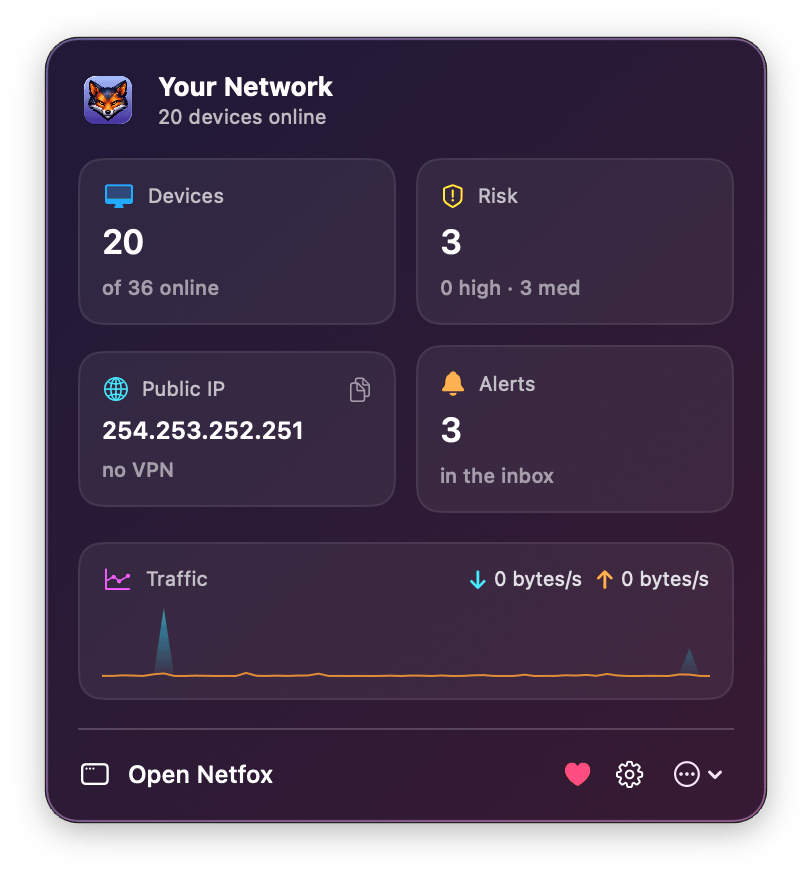
I build Netfox, a macOS network monitor. It lives in two places at once: a full window, and a menu bar popover that shows your network at a glance — devices online, risk level, public IP, a little live traffic chart.
The popover has four status cards. Someone asked the obvious question: “can I click a card and have it open that section in the main window?”
Sure. Easy. Except it wasn’t, and the reason why is a nice little lesson about how SwiftUI scenes are isolated from each other.
Why the obvious approach doesn’t work
In a single-scene SwiftUI app, the way you’d wire a “menu command triggers an action in a view” is @FocusedValue / .focusedSceneValue. The view publishes a closure; a command elsewhere reads it. Clean.
But a MenuBarExtra is its own scene, separate from your WindowGroup/Window. Focused-scene-values are scoped to a scene tree — they don’t cross from the popover scene into the main window scene. So the popover literally cannot reach the main window’s selection state that way.
And it gets worse. My app is “dual-mode”: closing the main window doesn’t quit it (the MenuBarExtra scene keeps it alive). So at the moment a popover card is clicked, the main window might not exist at all. There’s no view to send a message to.
You can’t message a window that isn’t there.
The shape of the fix: a tiny shared router
The trick is to stop thinking “popover → window” and start thinking “popover → shared state → window, whenever it shows up.”
A ten-line @Observable singleton both scenes can see:
import Observation
@MainActor
@Observable
final class ShellRouter {
static let shared = ShellRouter()
/// Section the shell should switch to at the next opportunity.
/// `nil` = nothing pending.
var pendingSection: AppSection?
private init() {}
}That’s the whole bridge. The popover writes to it; the window reads from it.
The popover side: queue, open, dismiss
private func openSection(_ section: AppSection) {
    ShellRouter.shared.pendingSection = section   // queue the destination
    openMainWindow()                              // raise / recreate the window
    dismiss()                                     // close the popover
}
openMainWindow() is just openWindow(id: "main") plus NSApp.activate(...). If the window was closed, openWindow recreates it. If it was already open, it comes forward. Either way, a fresh pendingSection is sitting in the router waiting to be consumed.
The window side: the part everyone gets wrong
Here’s the subtlety. You need to consume pendingSection in two places, because there are two completely different timelines:
NavigationSplitView { ... } detail: { ... }
// Timeline A: the window was CLOSED and just got recreated.
// Its .task runs on mount — and a value set *before* mount
// can’t be observed by .onChange, because .onChange only fires
// on *changes that happen while mounted*.
.task { consumePendingSection() }
// Timeline B: the window was ALREADY OPEN. The popover sets
// pendingSection while the shell is mounted — .onChange catches it.
.onChange(of: router.pendingSection) { _, _ in
consumePendingSection()
}private func consumePendingSection() {
guard let section = router.pendingSection else { return }
selectedSection = section
router.pendingSection = nil // ← clear it. this matters.
}If you only use .onChange, the window-was-closed case silently does nothing: the value was set before the view existed, so there’s no “change” to observe — .task is your only hook there. If you only use .task, the window-already-open case does nothing: the view’s already mounted, .task already ran.
You need both. They cover disjoint timelines.
Why the clear is load-bearing
router.pendingSection = nil after consuming isn’t tidiness — it’s correctness. Without it:
You click “Security” in the popover → window opens on Security. Good.
You close the window.
A week later you reopen the window normally (from the Dock, not a popover card).
.taskfires, finds the stalependingSectionstill pointing at Security, and yanks you to Security instead of your default tab.
Clearing on consume makes the destination strictly one-shot.
The takeaway
When two SwiftUI scenes need to talk and one of them might not be alive yet, don’t look for a direct channel — there isn’t one. Put the intent in shared observable state, and have the receiver drain it both on appearance (for the just-created case) and on change (for the already-alive case). Then clear it, so intent doesn’t outlive its moment.
It’s the same idea as a message queue with at-most-once delivery, shrunk down to a single @Observable property. Sometimes the smallest abstraction is the right one.