

The problem
If you work on GitHub every day, you probably know the dance. You’re deep in a coding session, you want to glance at “how many PRs are open on my repos right now”, or “did that follower count tick up after the release post”, or “which of my repos did I last push to”. So you tab over to the browser, wait for the page to load, click through to a sub-view, squint at the numbers, and tab back. Thirty seconds later you’ve lost your place in the code.
The data itself is trivial. It’s the context switch that’s expensive.
The solution
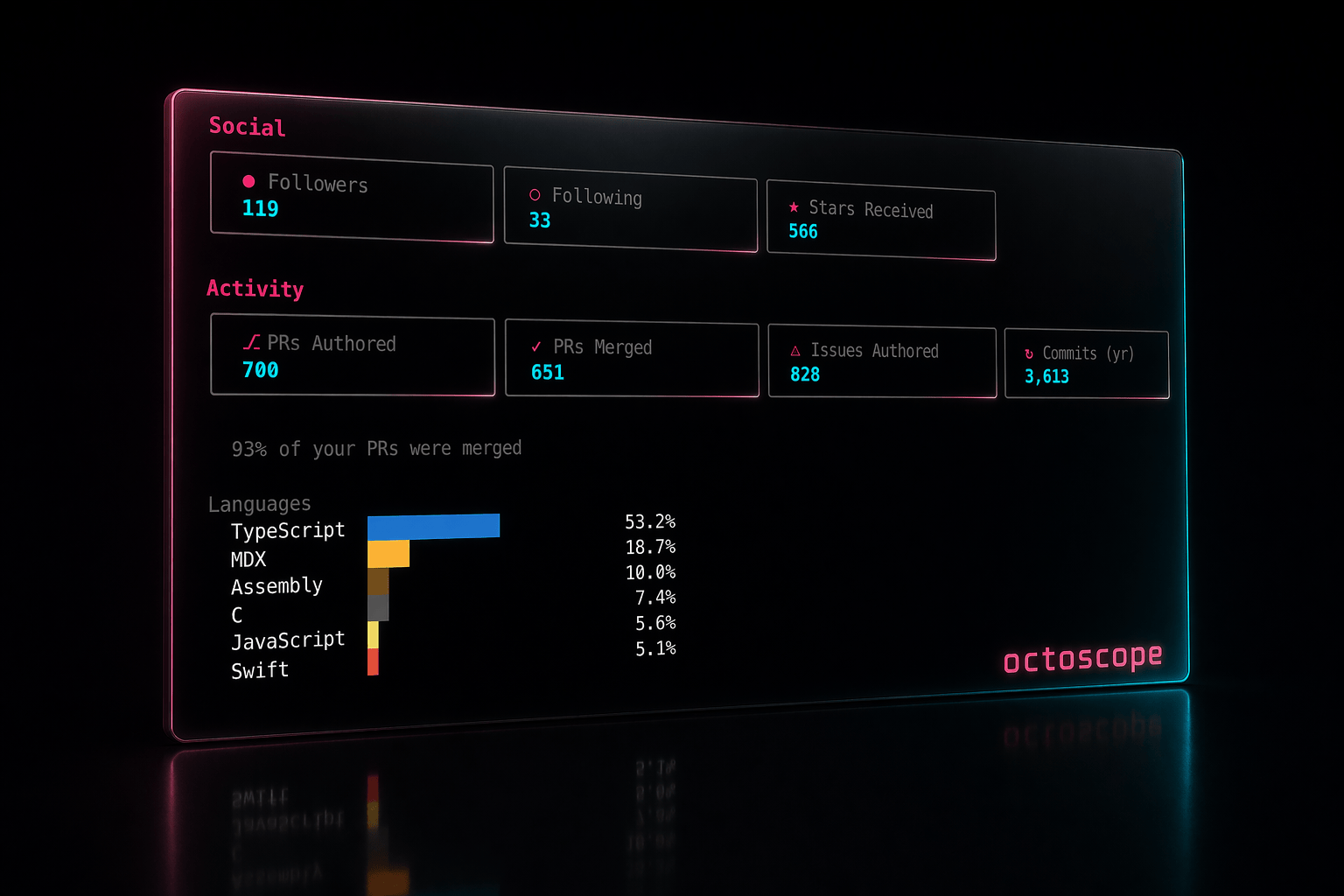
octoscope is a terminal dashboard for your GitHub account — profile, repos, pull requests, issues, contribution activity — pulled from the GitHub GraphQL API in a single round-trip and kept on screen, auto-refreshed every 60 seconds. You run it once in a background terminal tab and it’s always there when you need it.
Single binary. Cross-platform (macOS, Linux, Windows). No runtime dependencies. No config file. If you have a shell, you can run octoscope.
octoscopeThat’s it. If you have a GitHub token in your environment, it detects it and renders your own dashboard. If not, you can pass any public username as an argument:
octoscope torvaldsWhat it shows
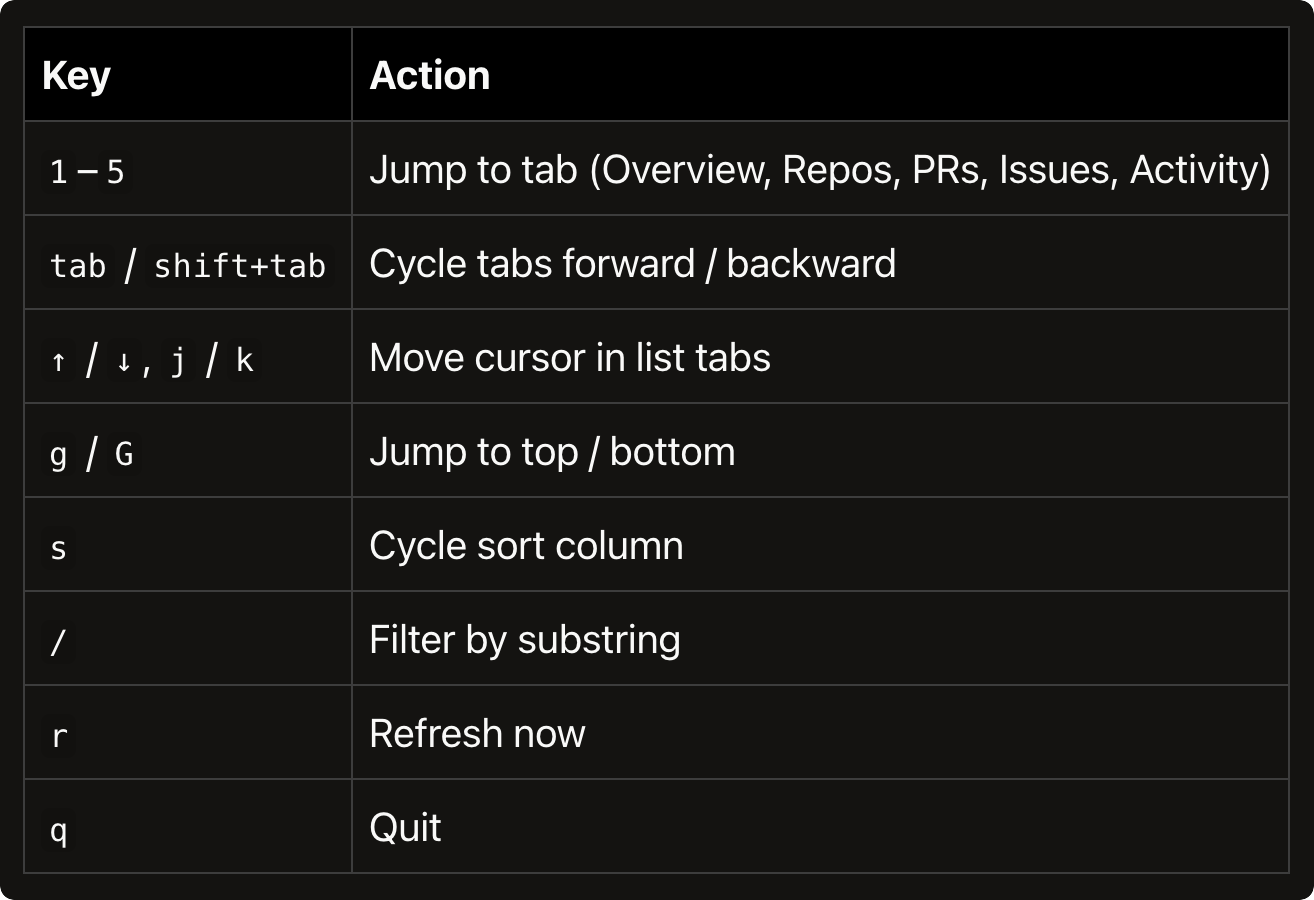
The UI is split into five tabs, navigable with number keys 1–5 or tab / shift+tab. The profile header stays pinned at the top; only the body swaps.
Overview — the landing page
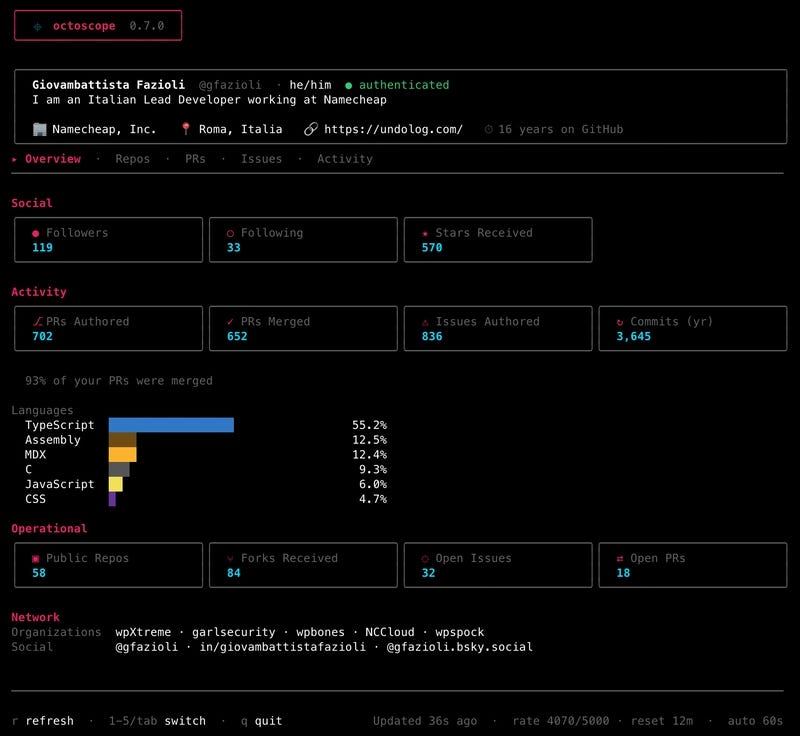
The classic dashboard: profile info (name, login, pronouns, bio, company, location, website, years on GitHub), a Social section (followers, following, stars received), an Activity section (lifetime PRs authored and merged, issues opened, commits in the last 12 months, plus a languages bar coloured with the same hex GitHub uses on the site), an Operational section (public repos, forks received, open issues, open PRs), and a Network section (organisations you’re in, verified social accounts).
Repos — every repository in one list
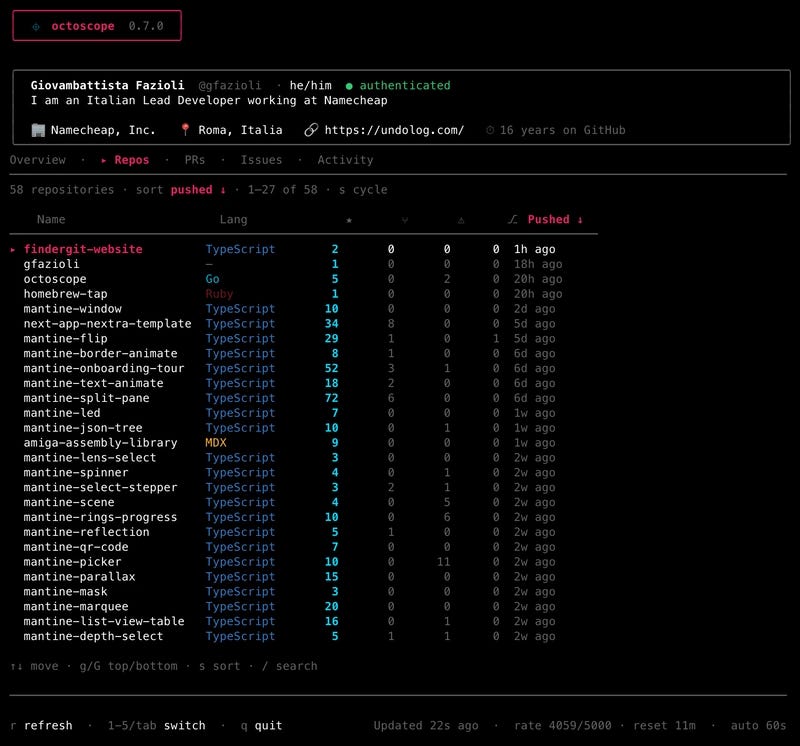
Every owned, non-fork repository as a sortable, searchable table. Columns: name, primary language, stars, forks, open issues, open PRs, last push. Press s to cycle sort by any column, / to filter by substring. The viewport scrolls, so even a 100-repo account stays navigable.
PRs — every pull request you’ve opened
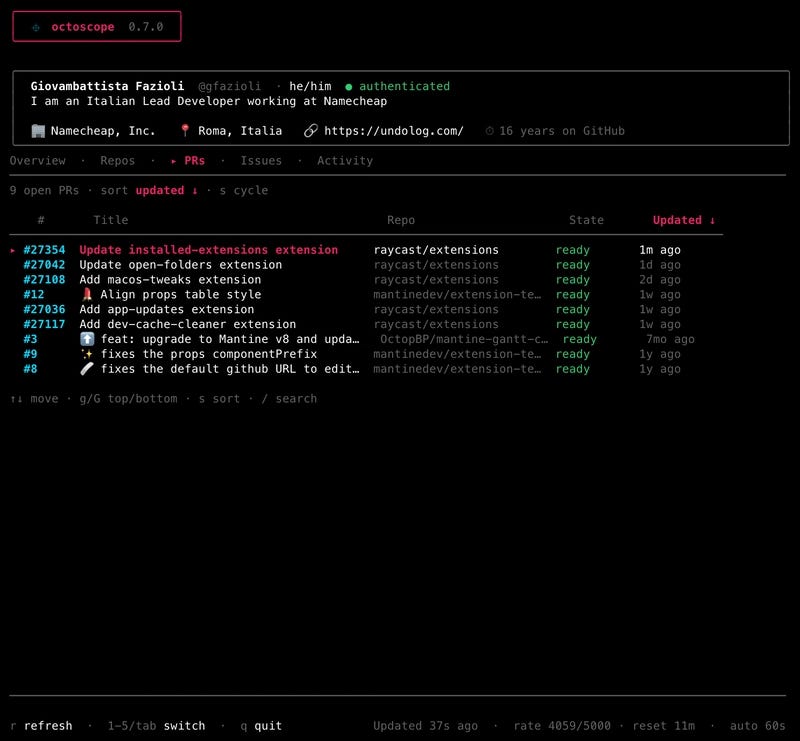
Every open pull request you’ve authored, across every repo you’ve ever touched — not just your own. Number, title, repo, state (draft / ready-to-merge / conflicting) and last-update time. Same sort & search idioms as Repos.
Issues — every open issue you’ve opened
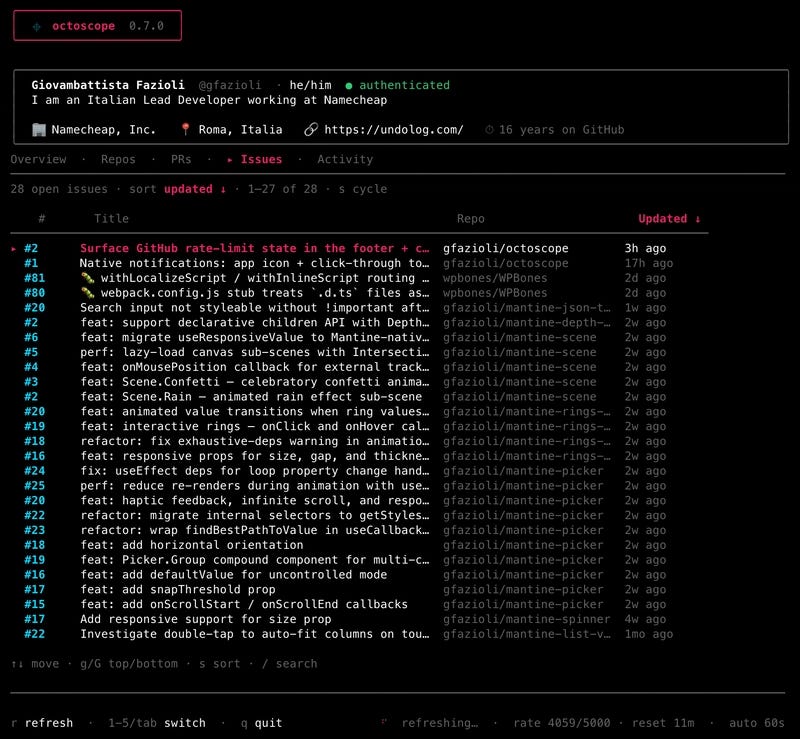
Same shape as PRs, minus the state column. Every open issue you’ve authored, wherever it lives. The whole backlog in one keystroke.
Activity — your year, shaded
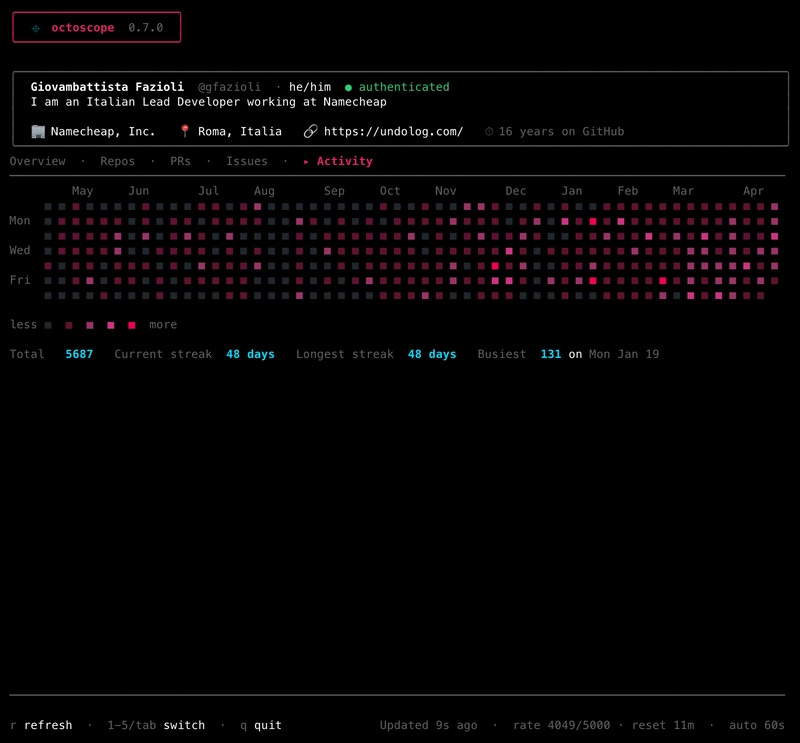
A 52-week contribution heatmap rendered on an accent-pink gradient, with month labels above and a summary line below: total contributions, current streak, longest streak, busiest day with its date. The gradient adapts to your own distribution, so the busiest day always hits the full neon pink regardless of your absolute volume.
The details that matter
Rate-limit awareness, live in the footer
GitHub’s GraphQL API has a 5,000-points-per-hour ceiling on authenticated calls. octoscope surfaces your remaining budget live in the footer:
Updated 12s ago · rate 4872/5000 · reset 23m · auto 60sThe chip is muted at normal levels, warn-yellow under 20% remaining, and error-red under 5%. No surprises when you’re close to the ceiling. If you do hit it, the auto-refresh backs off until the reset time instead of hammering every 60s and making it worse.
Fetch errors that tell you what to do
When a refresh fails, the footer says why in plain English:
rate-limited · retry at 14:23— bucket exhausted, here’s when it refillstoken rejected · check $GITHUB_TOKEN— auth problem, actionableoffline · retrying— network blipgithub errored · retrying— 5xx from GitHub, wait it out
You know whether to wait, fix auth, or check the network — instead of staring at an opaque error indicator.
Live change feedback
When a value changes between two refreshes — a new star, a new follower, a PR merging — the affected card’s border flashes accent-pink for two seconds. No diffing numbers with your eyes.
And on top of that, changes to Stars and Followers trigger a native system notification and a short audio beep. You notice passive attention even when octoscope is in a background tab. macOS, Linux and Windows — no configuration needed.
Screenshot-safe by default when you want it
If you manage private repositories (work, internal projects, drafts) and you’re about to share a screenshot of your dashboard, one flag scrubs the output:
octoscope --public-onlyPrivate repos, PRs and issues are filtered from the Repos / PRs / Issues tabs. Global counters (PRs Authored, Merged, Issues Authored) stay complete since they’re aggregate numbers, not titles. What gets hidden are repo names and PR/issue titles — the parts that actually leak context.
Authentication that just works
octoscope resolves a GitHub token in this order:
$GITHUB_TOKENenvironment variablegh auth token— if the GitHub CLI is installed and logged inNo token — unauthenticated fallback (60 req/h, public profiles only)
Viewing your own account needs a token. Viewing anyone else’s public profile works either way.
Getting started
Homebrew (macOS & Linux)
brew install gfazioli/tap/octoscopeFrom source (Go 1.25+)
go install github.com/gfazioli/octoscope@latestPre-built binaries
Grab the right archive for your platform from the latest release and drop the octoscope binary anywhere on your $PATH.
Key bindings
What octoscope won’t show
A note on honesty: some things you see on your GitHub profile page are not exposed by GitHub’s public API, so octoscope doesn’t show them either. Achievements (Pull Shark, Starstruck, YOLO and friends), highlight badges like PRO, and the local time next to your location field all require scraping the profile HTML. octoscope stays API-only, so those are absent by design.
Built with BubbleTea
octoscope is a terminal UI built with BubbleTea — the ELM-inspired TUI framework from Charm — and styled with Lipgloss. The network layer uses shurcooL/githubv4 against the GitHub GraphQL API, one round-trip per refresh.
The whole thing is open source under the MIT license.
Links
🌐 Landing: https://gfazioli.github.io/octoscope/
📦 GitHub: https://github.com/gfazioli/octoscope
📋 Releases: https://github.com/gfazioli/octoscope/releases
🐛 Issues & ideas: https://github.com/gfazioli/octoscope/issues
If you live in the terminal and you’re on GitHub every day, give it a spin. Feedback, bug reports and feature asks are genuinely shaping the roadmap — every issue ticket has been read.