

Two weeks, forty-eight releases across seven products — one of them brand new, glancecard, three releases within a day of its first commit — and on the Mantine side nine releases of their own, riding on three alignment sweeps across all 26 components. The thread this time is a change of verb. Lancetta used to tell you how much quota you had left; since 0.50 it tells you what to do about it. FinderGit’s new Agents page does not stop at a finding, it offers the fix. Netfox’s Wi-Fi tool went from reading networks to joining them, and WP Bones 3.0 now decides, for a plugin that never said, who may open its pages. A tool that acts on your behalf has to be stricter than one that only reports, and most of this fortnight went into where to draw that line: a fix is shown line by line and applied whole or not at all, anything that needs judgement goes to an agent that has to propose before it writes, a folder is checked once more in the instant before it is deleted. Twice the line was in the wrong place, and you will find both below: Lancetta’s Reclaim could stop a session that was still working, and for a day Netfox put a green lock on every open Wi-Fi network.
A word on the version numbers first, because all three Mac apps jumped to 0.50 within three days — Lancetta from 0.17, FinderGit from 0.47, Netfox from 0.29. There are no releases in between to go looking for; the number says how much changed. Part of what changed is shared: FinderGit’s Agents page and Lancetta’s Maintenance pane are the same dashboard, and the cards that now open in place in all three apps are the same deck, written once in a package the apps share, AgentsKit. So some fixes now arrive everywhere at once: on the 13th, cards that replayed their whole entrance on every window resize stopped doing it in FinderGit and Netfox. The same day, the Discord logo in all three About windows, drawn with its right side missing, was made whole, that one by hand in each app. The oldest shared bug had nothing to do with that package: on the 2nd, all three apps fixed a Check for updates on launch switch whose check had never actually run — it asked while the updater was still starting up, and was quietly turned away. If you were on an older version, you heard about that fix the old way.
Lancetta
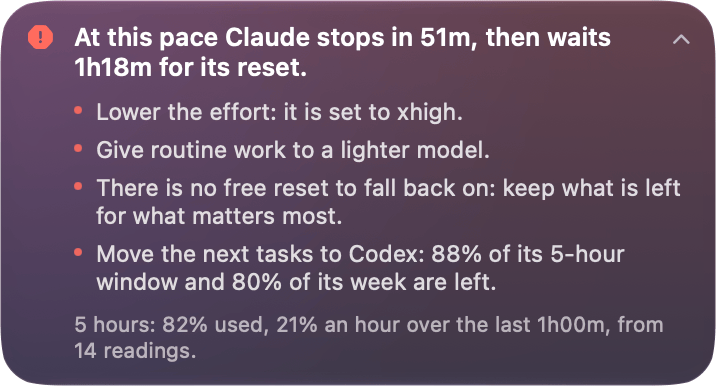
It tells you what to do, not just what is left (0.50.0). A quota monitor that shows 82% has done its part and left you the hard one: deciding whether to slow down, switch model or carry on. 0.50.0 puts suggestions at the top of the panel, worked out on your Mac from Lancetta’s own readings — the account’s reports, how fast you are going, when each window resets, any free reset you hold, the effort you have set. No model is asked, and every suggestion shows the readings it rests on. When you are heading for the wall it says when, and what to do about it: At this pace Claude stops in 51m, then waits 1h18m for its reset — lower the effort, give routine work to a lighter model, or move the next tasks to the agent that still has room. It works the other way too, because a low number on the menu bar can be capacity you are wasting rather than good news: Codex has room: 88% of this 5-hour window is unused, and it resets in 39m. An urgent suggestion arrives once as a notification, and when nothing needs changing, it says so, in green.
What your agents read before you type (0.50.0 → 0.54.0). The other half of 0.50.0 is a Maintenance pane. Claude Code and Codex read a stack of files at the start of every session — CLAUDE.md, AGENTS.md, rules, skills, memory — and nothing tells you when that stack has grown past the size at which Claude Code warns. Maintenance measures each repository’s start against that size and runs twenty checks. Five kinds of fix are applied whole after a line-by-line preview; the rest open Claude Code in plan mode with the prompt already written. 0.51.0 hands Codex the files that belong to it and makes both agents propose before they change anything: Codex cannot be started in its Plan mode from outside its own window, so it is told to propose and wait, and its sandbox may write only in the repository and the file’s folder. 0.53.0 adds Fix All — one preview of every fix that needs no choosing — and a check for the programs your setup calls that cannot start: a hook, a status line or an MCP server pointing at a program that is missing or cannot run, a path with a space and no quotes, a variable nobody fills. Three kinds it fixes itself, each offered only when the program would then start: quotes round the path, execute permission for a script, and the variable written the way Claude Code fills it in. And 0.54.0 noticed that Maintenance had only ever asked Claude Code where you work, so a repository you only open with Codex was never checked; it now reads Codex’s last thirty days too. FinderGit has the same page under another name — more on that below.
The rate, not the average (0.15.0, 0.16.0). The line under each bar used to project the window’s average to its reset — at this pace 96% by reset — and late in a week that average spreads one afternoon of work across idle nights, so it mostly repeated the bar. The question you actually have is if I keep going like this, when do I have to stop?, and since 0.15.0 the line answers it in amber, from the last hour or so of readings: at this rate you run out in 2h00m. It speaks only when you would run out before the reset and within a few hours, and only for the window that would stop you first. 0.16.0 was meant to go further, with a forecast each morning of how far into the day the 5-hour window would carry you. It did not ship: over two and a half weeks of readings, none of six kinds of morning forecast beat a single fixed number chosen afterwards, and neither of the two days Codex ran out was foreseen — the numbers are on the roadmap. What shipped instead needs no forecast: working hours, off by default, so the run-out line goes quiet when you would only run out after your day ends and notifications outside your hours go silently to Notification Centre; and a Usage card with each day’s fullest 5-hour window, Codex and Claude side by side.
Seven languages (0.14.0 → 0.17.0). Lancetta follows your Mac’s language now — English, Italian, French, German, Spanish, Portuguese and Dutch — with nothing to set up. Much of what it says is a sentence about time, at this pace it is spent by tomorrow afternoon, and it does not reset until Thursday afternoon, and those had been assembled a phrase at a time in English word order; they are translated as whole sentences now, with weekdays and dates in the sentence’s own language. 0.14.0 also shipped a bug no translation explains: a window card, usually Codex’s, could show its title and labels upside down while its numbers looked fine, until 0.14.1 the next day. 0.14.2 translated the Processes rows the first pass had missed, and 0.17.0 gave Dutch two different words for Alerts and Notifications, which had been sharing one.
Reclaim, and a folder with a double dash in its name (0.14.1, 0.16.1). Reclaim stops agent processes that have been left orphaned, and it could stop one that was still working. Lancetta read a process tree’s folder from the process list, which joins arguments with spaces and quotes nothing, so a folder with -- in its name came back cut short, as a path that does not exist, and the tree looked abandoned. 0.14.1 had added a second check at the moment you confirm — and that check read the folder the same way. Since 0.16.1 the arguments come from macOS one at a time, and a tree Lancetta cannot read is never treated as gone. Two smaller confessions from the same fortnight: the pin on the panel was supposed to let you move it off the menu bar, and the panel never moved (0.15.2); and signing Codex in to another account could carry the old account’s free resets over: shown for the new one (0.14.1), or announced as a fresh grant if Lancetta was closed at the time (0.16.1).
And the rest. A click anywhere on an agent’s card opens the window (0.15.1). Notification settings had lived in three places — if you wanted to know why a notification had or had not arrived, you had three places to look — and now have one pane of their own (0.17.0). The panel’s footer gave way to a gear menu, with Refresh Now on a right-click of the menu-bar item (0.51.0), and About went to two columns, like FinderGit’s and Netfox’s (0.52.0, 0.52.1). Fifteen releases, 0.14.0 → 0.54.0; free, universal, signed and notarised, on macOS 15 or later.
FinderGit
What your coding agents read before you type (0.50.0, 0.51.0). Claude Code, Codex, Cursor, Copilot and Gemini CLI each read a stack of files at the start of every session, and every session pays for all of it again, before your first word — with nothing to tell you when the stack has grown too big, or when part of it is never read at all. The new Agents page scans those files across your repositories, the folders above them and your home folder, shows what each start costs, and runs checks that each say why they matter: twenty in 0.50.0, twenty-two by 0.51.0. When a finding has exactly one right answer, the fix is shown in full and applied whole or not at all; when it needs judgement, Fix with Claude Code opens it in plan mode, or Fix with Codex, with the prompt already written. 0.51.0 gathers every fix that needs no choosing into one Fix All preview — every file and every line — before anything is written. It is the same dashboard as Lancetta’s Maintenance pane, and Lancetta 0.53.0 shipped the same changes the same day.
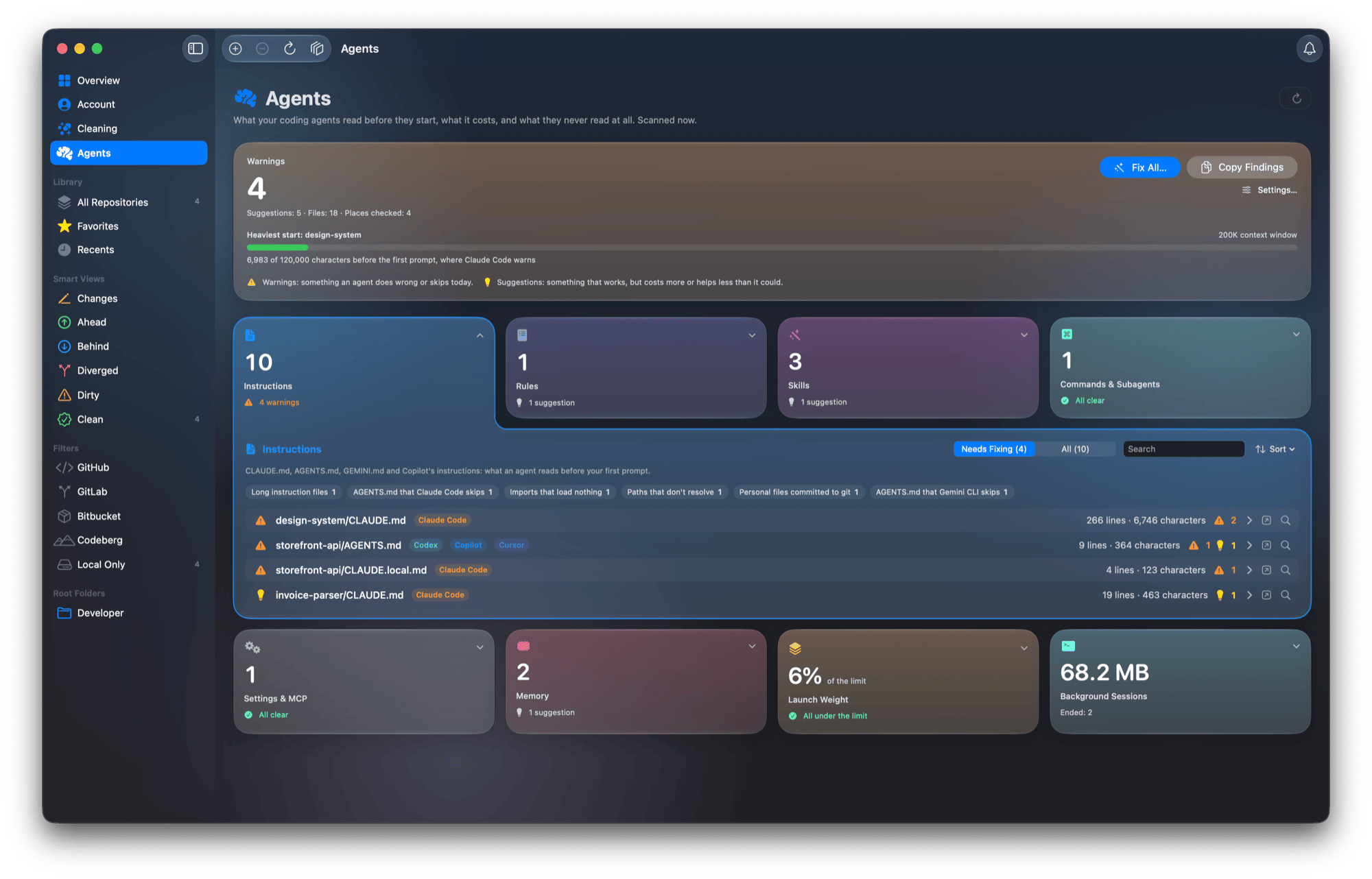
AGENTS.md that Claude Code skips, then Rules, Skills, Commands and Subagents, Settings and MCP, Memory, a launch weight at 6% of the limit, and 68.2 MB of ended background sessionsYour disk space back (0.44.0, 0.50.0). Disks fill up with folders you never wrote — node_modules, .next, DerivedData, the npm, Yarn, Homebrew and Go caches. On my own Mac the first scan found about 30 GB. The new Cleaning page counts them up in eight cards and pre-ticks only what is safe: not in use and, inside a project, untouched for a month; everything else carries a badge saying why it was left alone. Inside a repository a folder qualifies only if the repository’s own .gitignore ignores it and it sits beside its project file — nothing Git tracks, no symlinks, nothing inside .git — and every folder is checked again just before it is deleted. Deleted, not moved to the Trash: the space is the point. The size shown is what deleting that one folder frees, and 0.50.0 stopped quietly leaving out the two kinds of folder where that answer is not simple: node_modules that live in a shared clone store, now listed with a Shared badge and what deleting them would really free, and build folders committed to git, listed with an In git badge and never ticked or cleaned.
The Overview tab, now a dashboard you can take with you (0.45.0, 0.46.0). The per-repository Overview was the quietest corner of FinderGit, and nearly empty for any repository that did not live on GitHub. It is a dashboard now: a pulse — Active, Steady, Quiet or Dormant, from the newest commit — when history began, the latest tag and the commits waiting on top of it, a headline from the GitHub description or the README’s first sentence, twelve tiles that each open their tab, a year of commits with its streaks, a weekday-by-hour chart, languages, project hygiene files, recent commits and releases, contributors. Almost all of it is read from the repository itself, so a local-only repository gets the whole thing. A dashboard is something you want to put in a pull request or a status update, and a window screenshot rarely does it justice, so 0.46.0 exports it — PNG, PDF or the clipboard — at full height and two columns wide whatever the size of your window, with the repository, branch and date across the top. And 0.45.1 fixed English footnotes that had been printing raw markup, ^[of 3 repository](inflect: true), instead of of 3 repositories.
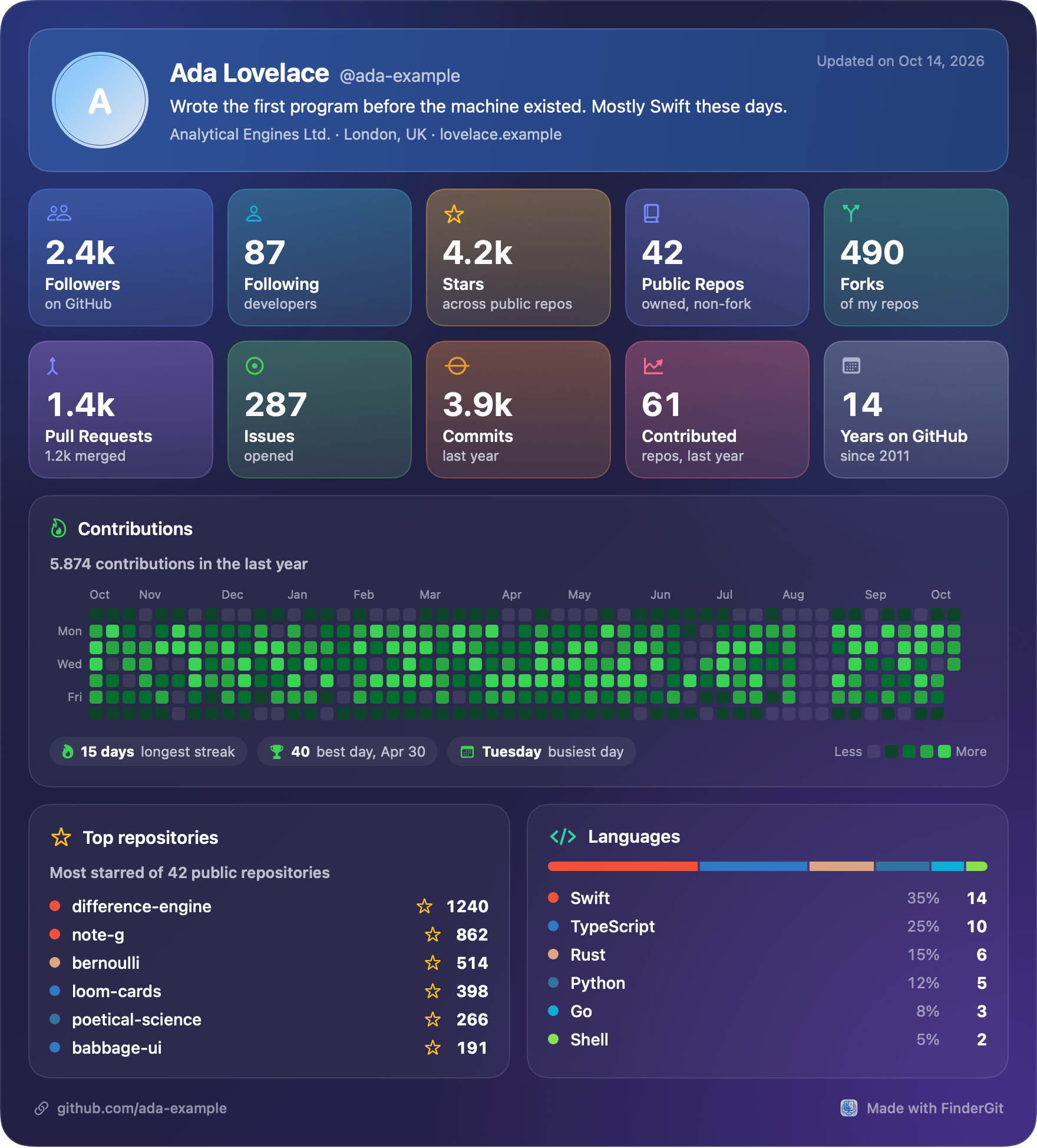
Your GitHub profile on one card (0.52.0, 0.52.1). Some things you keep for yourself; a GitHub profile is made to be shown. The Account page now renders as one picture: ten figures, a year of contributions with the longest streak, best day and busiest weekday, your most-starred repositories and your languages. It comes in nine looks — Midnight, Aurora, Daylight, Upside Down, Hyperspace, Bridge, Nebula and two seasonal ones: Halloween is in the menu until 2 November, and Christmas arrives on 1 December and leaves after Epiphany. Save it as a PNG at twice its size or a one-page PDF, copy it or share it. Repository figures come from public repositories only, so a private repository’s name never reaches the picture. 0.52.1 adds a switch that draws the year as a line — each day the average of the week up to it, so you read a trend instead of a comb of spikes — and fixes the Account page’s own contribution graph, whose curves overshot and drew a negative count that never happened.
Zoom, pull to refresh, and a sidebar your way (0.41.0 → 0.47.0). Zoom now scales the whole content of the window, file browser to dashboards, from 75% to 300% like Safari, while the sidebar and toolbar stay put so the controls never move while you are reaching for them. On macOS 27 every list and the repository panel refresh with a pull, the way Mail does — and a pull never fetches, pulls or pushes; it reloads what you are looking at. Then 0.47.0, from a reader who wrote in with two small wishes: sidebar sections that collapse like Finder’s and rows you can hide, in a new Appearance pane. It also shows a detached HEAD plainly, and the buttons that must wait for a running pull or push now dim and say why in a tooltip — before, they looked ready and refused the click. Fourteen releases, 0.41.0 → 0.52.1, on macOS 15 or later; pull to refresh needs macOS 27.
WordPress: WP Bones and Scotty
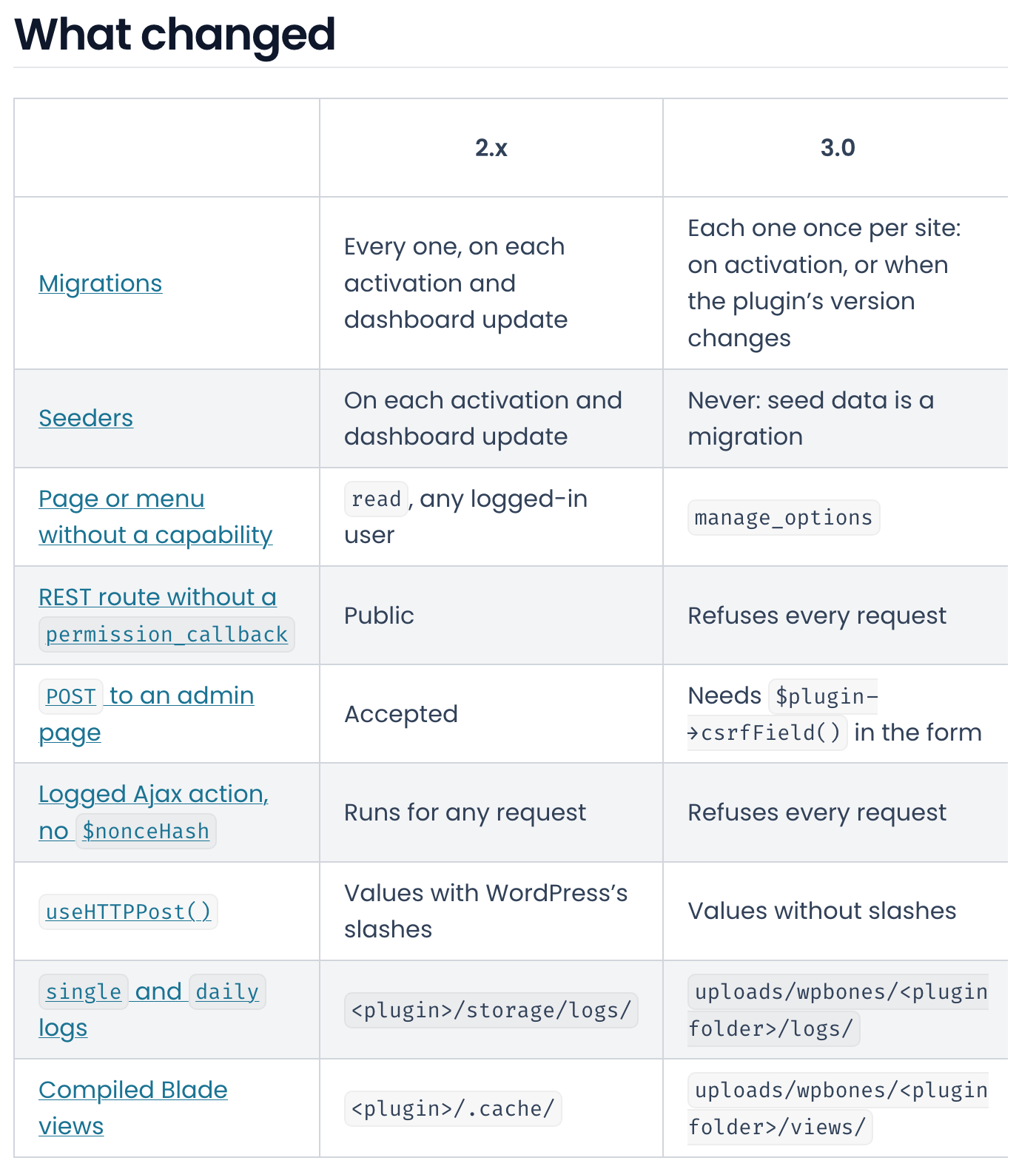
When a plugin says nothing (WP Bones 3.0.0). A framework makes a choice every time a plugin leaves something out, and in 2.x those choices were the convenient ones. 3.0 makes them the safe ones. A page or menu that declares no capability is now for administrators, where any logged-in user could open it before; a REST route with no permission_callback refuses every request instead of being public; every non-GET request to an admin page needs a nonce. Migrations run once per site — on activation, or on the first request after the plugin’s version changes, however it got there — where 2.x ran every migration and every seeder again on each activation and dashboard update, with the old code still loaded; seed data is a migration now. Logs and compiled views move out of the plugin’s folder into wp-content/uploads/wpbones/. PHP stays 8.1+, and php bones migrate:to-v3 converts what it can and lists what it leaves to you.
The same day, for everyone staying on 2.x (2.1.1 → 2.1.3). Two of those defaults were security bugs, and they were fixed in 2.x first, in a form that breaks nothing. Pages from config/routes.php and pages/ have no menu entry, and any logged-in user — subscribers included — could open them, because the documented capability key was never read; it is read now, with read as the default (2.1.2). And the default logger was also writing a log file into a world-writable folder inside the plugin, which the web server serves, while compiled Blade views could be downloaded as source (2.1.3). If you have run an older 2.x, those log files are still there, and they have to be deleted by hand. 2.1.1, earlier that morning, fixed activation running before the plugin’s header had been read, which saved the plugin’s options under a row with no name. Plugins on ^2.x stay on 2.1.3 until they change their constraint.
Your stubs, and your tests (3.1.0, 3.2.0). The make:* generators read their templates from vendor/, so every composer update threw away whatever you had changed in them; they now look in the plugin’s own stubs/ first, and php bones stub:publish puts them there — with the catch that a published stub no longer follows the framework’s. And php bones deploy now leaves test suites out of the package: with --wp, Jest tests had been travelling to WordPress.org, and Scotty’s 2.2.0 package carried four such folders, removed by hand. If the package’s autoloader still requires a file the deploy left out, the deploy stops and names it, rather than shipping a plugin that fails on every request.
Nine add-on packages, read again for 3.0. On the 7th, Geolocalizer 2.0.0 moved its countries table from a seeder to migrations, because 3.0 runs no seeders; wptables 1.1.0 started requiring a nonce on bulk actions — its form is a GET, which 3.0’s check does not cover, so a link could trigger one; and two packages fixed fatal errors, one of them in the very calls its README documented. The 14 boilerplates moved with every framework release.
Scotty 2.2.1. Scotty is the maintenance plugin built on WP Bones. It now translates whole sentences, plurals included — 257 of 257 strings in Italian, Spanish, French, German and Brazilian Portuguese — and its duplicate lists are several times faster: 6.2 seconds down to 1.1 for post meta on 300,000 rows. The Database tools now reach only this site’s own tables, which matters on a shared database or a multisite network, and Optimize and Reset Auto Increment report an error instead of announcing success. Bannerize had nothing new this fortnight.
wpbones.com · Scotty on WordPress.org
Netfox
From reading Wi-Fi to joining it (0.29.0). Netfox could tell you your signal was weak or your channel crowded, and then leave you to fix it somewhere else. Now Join… opens a sheet that names the network you are about to leave and warns you when the new one is open; the password goes to macOS for that one join, and Netfox keeps nothing. When the verdict says your link has a problem, a network you already know that is at least ten decibels louder, and good in its own right, is offered with Switch… — and nothing is suggested while your Wi-Fi looks fine. The list works like Devices now: filter by band, known networks or networks with no password, and search by name, address, maker or security, so even a hidden network can be found by the maker of its access point. One honest limit: it asks for the password every time, even for a network your Mac knows, because it does not read the one macOS saved.
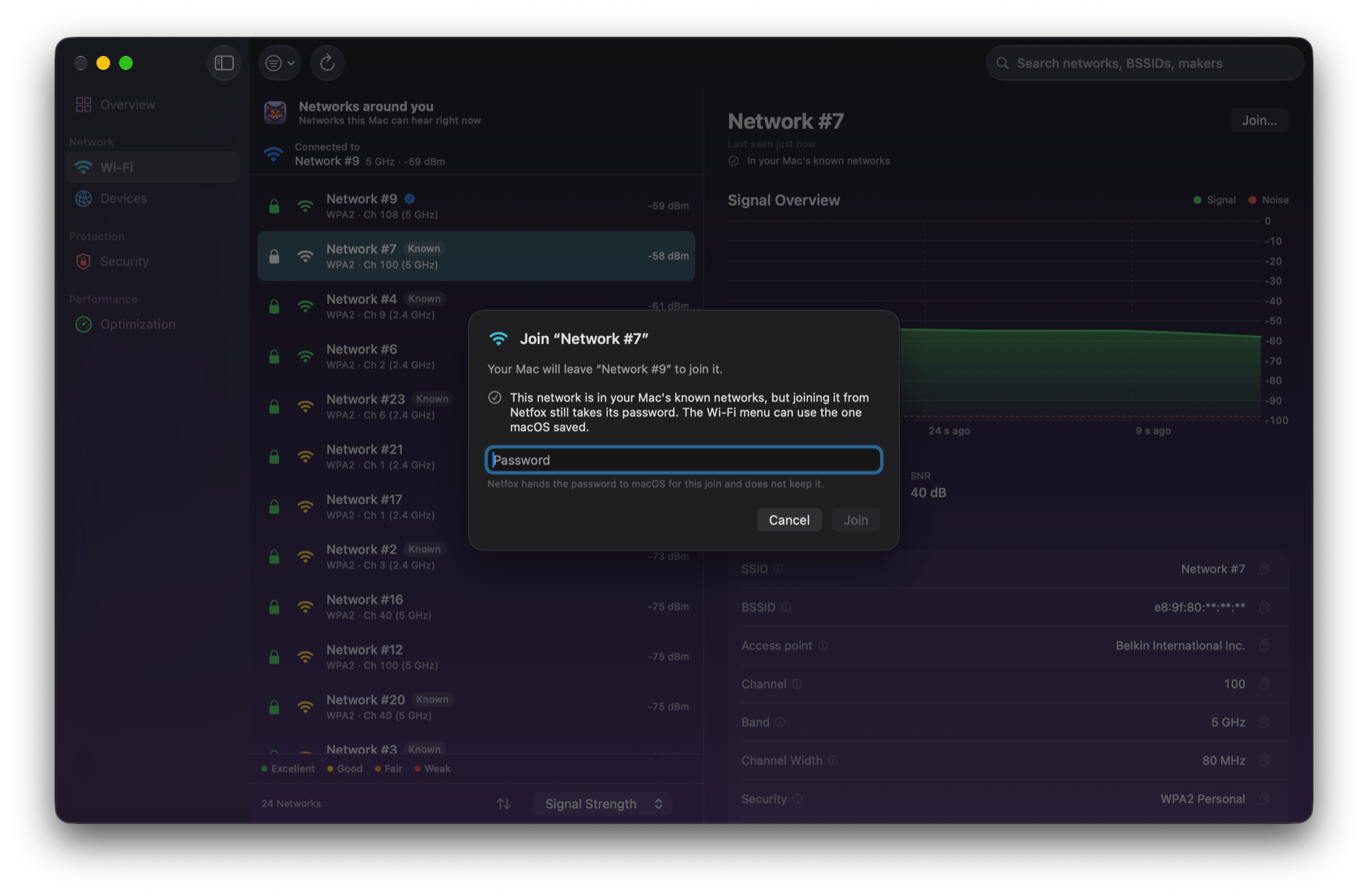
The green lock that said too much (0.29.1). 0.29.0 also learned about Enhanced Open — networks you join without a password that still encrypt what you send, which deserve a green lock while a plain open network gets a red one. But the check behind it said yes to every network without a password, so for a day every open network wore the green lock, and Join… told you your traffic would stay encrypted. On an open network, it does not. 0.29.1 calls a network Enhanced Open only when it really encrypts, and Join… warns that what you send over an open one can be read by anyone nearby. The same misreading made a plain WPA2 network list modes it does not offer — WPA Mixed, WPA2 Personal, WPA3 Transition — and it now reads WPA2 Personal. If you joined an open network thinking it was encrypted, look at System Settings → Wi-Fi → Known Networks: your Mac can rejoin a known network on its own, open ones included.
The numbers open (0.50.0). Netfox would tell you three devices were at risk and make you leave the page to find out which. On the Overview, the Risk, Devices and Alerts cards now open into a panel right underneath; every row opens its device, and a risky one lands on its Ports tab. The page opens on the most urgent card. On Security, the high, medium, low and untested counts are cards too, and low-risk devices finally have a list of their own. And closing the window no longer means looking away: it used to stop discovery, alerts, scheduled port scans and the metrics endpoint without a word, while the menu bar looked alive. Now they run until you quit. Smaller, in the same release: a USB Ethernet adapter on the driver built into macOS no longer gets a false below top speed warning, and This Mac no longer shows 127.0.0.1 as its address.
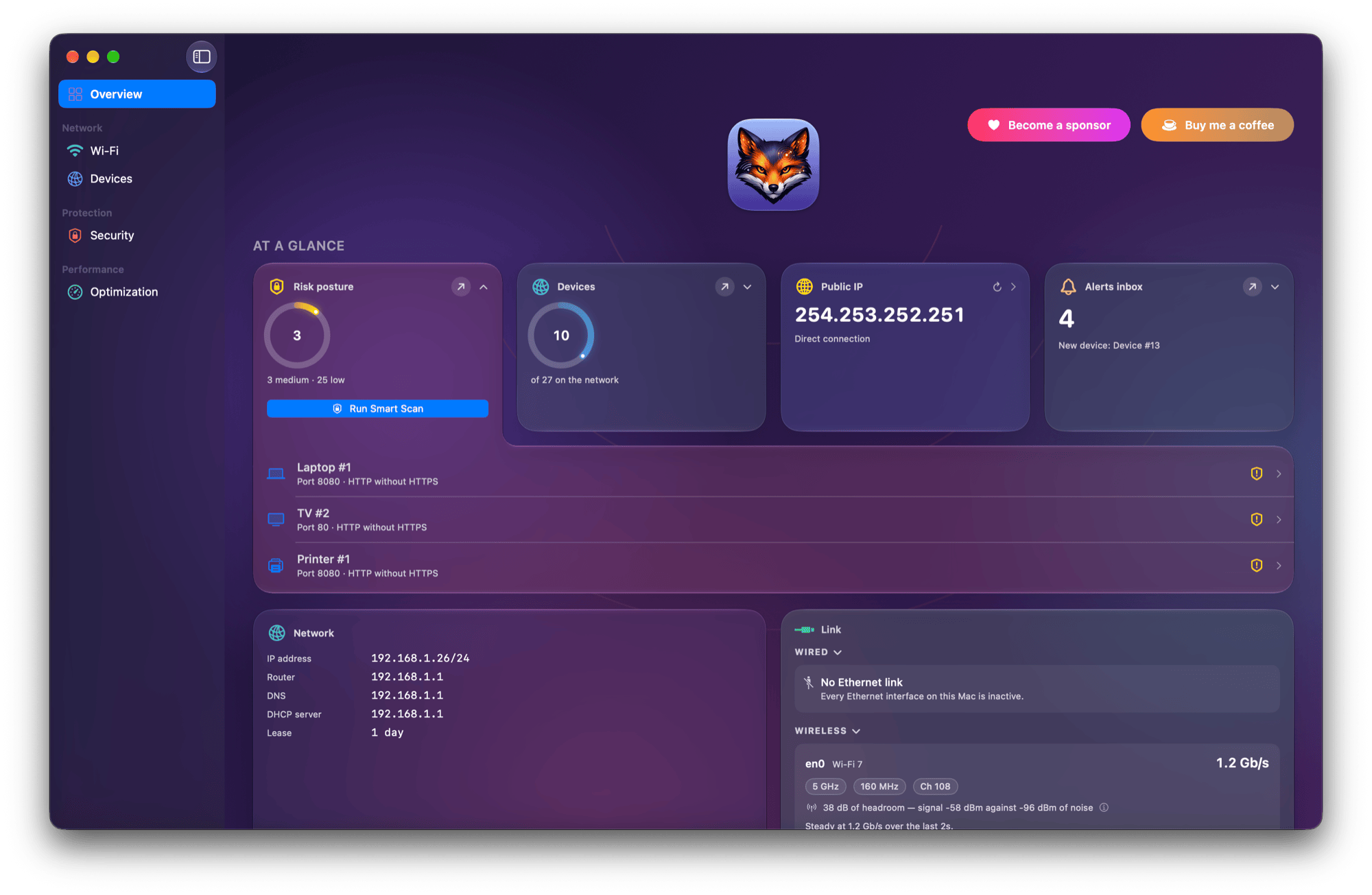
Fold what you do not read, and stay lean (0.51.0). Sections in the narrow panes fold with a click — a device’s details, the Link card, a Wi-Fi network’s details — and Netfox remembers the fold on every device and across restarts. A folded Wired or Wireless section shows an orange mark when it is hiding a warning, so folding never means not knowing. Each alert in the notch now says what happened: a new device, one that came back, a port that opened. And a cost 0.50.0 had not paid: an app that now runs for days with its window closed had in-memory lists that grew for as long as it ran. Alerts older than 90 days leave them now, and the signal history of a Wi-Fi network unseen for ten minutes is let go. Five releases, 0.28.1 → 0.51.0, on macOS 15.6 or later.
octoscope
Your last dashboard, at once (0.39.0). Every launch used to wait on GitHub — about ten seconds on my account — before showing anything. Now octoscope opens on the last dashboard it drew, with the footer saying so, cached 3h ago · refreshing…, and swaps in the live numbers quietly when they arrive: no flash, no star notification. Offline, the dashboard stays up as offline · retrying · cached 3h ago. That fixed a bug as old as the project: since 0.1.0, any failed refresh replaced the whole dashboard with an error screen, so the footer’s offline message had never once been visible. The cache is a file only you can read, under a week old, written by the same version for the same token and account; it is never used with --public-only, --json, --plain or --scan, and dashboard_cache = false turns it off and deletes it. The first launch after upgrading still waits.
Is anything of mine compromised? (0.38.0). After every supply-chain worm the question is the same, and the scan answered it one repository at a time. octoscope --scan sweeps the default branch of every repository you own, plus your watch_repos — about 17 seconds for 95 repositories — and a repository it cannot read is reported as not scanned, with the reason, never counted as clean. Its --json output is a versioned contract. The scan was also wrong in a way worth owning: it called unsigned commits by github-actions[bot] forged, and flagged my own Homebrew tap and website. It now reads the recent changes to the files that can actually run code — hooks, tasks, package manifests, workflows. The repository view gained fourteen days of traffic and the most severe Dependabot alerts, with whether a fix exists, and a pull request that belongs to a stack now shows its layers.
What is waiting for you (0.37.0). The Inbox tab lived only in the dashboard, so a script had to call GitHub’s notifications API itself. --inbox adds up to 50 unread threads to --json and --plain, newest first, each with GitHub’s reason, the repository, the title and a link. As with --activity, a missing inbox key means you did not ask, [] means inbox zero, and a failed fetch fails the run. octoscope torvalds --json --inbox is refused, since it would print your notifications under someone else’s name, and a fine-grained token — which GitHub refuses for notifications — now gets an error naming the token you need instead of a bare 403. Before all that, 0.36.1 made the What’s new tab fit a 24-column terminal. Four releases, 0.36.1 → 0.39.0, also as the gh extension.
https://gfazioli.github.io/octoscope · brew upgrade gfazioli/tap/octoscope
glancecard
Your GitHub, as a card in your README (0.1.0, 0.2.0). glancecard is new, and this is its first appearance here. It draws daily SVG cards of your GitHub profile and of your repositories, for the READMEs you own: a repository card with its status, age and latest tag, thirty days of commits, twelve stat tiles, a year of activity with its streaks, the weekly rhythm, languages, the latest commits and releases and the contributors; a profile card with followers, stars, pull requests, issues, commits, a year of contributions and your most-starred repositories. The cards are drawn by a GitHub Action in your own repository, with the token every run already has, and committed as plain files — no server, no third-party service, no dependencies — and setting it up is one paste into Claude Code or Codex. It is careful by default: a private repository is refused unless you allow it, a history longer than it was told to read is stated on the card instead of being silently undercounted, and on a pull request the cards are rendered but never committed. 0.1.0 and 0.2.0 went out on the 14th, the second with nine looks taken from FinderGit’s Profile Card, the seasonal ones included. By the next day it was drawing the card under the title of sixty-one of my public repositories, and of every active public WP Bones one.
A shade is a range (0.3.0). GitHub’s green squares tell you which days you worked, not how much: a shade is a range. Since 0.3.0 the year is a line of daily counts over a value axis, on both cards, and calendar: grid brings the squares back. The profile card now asks GitHub for each day’s count, so the days in the chart add up to the total printed above it. There is no moving v0 tag, on purpose: you upgrade by pinning gfazioli/glancecard@v0.3.0, and Dependabot can open that pull request for you.

gfazioli.github.io/glancecard · GitHub Marketplace
Mantine extensions
Mantine 9.7 shipped two components of its own that overlap two of these — a Tour and a JSON viewer — and the answer was to read core point by point and close what could be closed. Five components with a core counterpart now carry a comparison table in their docs, and three of them — JSON Tree, Marquee and Window — have no row left that only core can do.
JSON Tree learned to edit (3.5.0 → 3.7.0). Diff highlighting, long arrays in collapsible groups, long strings behind show more, type badges and sorted keys (3.5.0); then renaming, adding, removing and reordering, from the mouse or the keyboard — key renaming had been called deliberately out of scope in the 3.4.0 notes (3.6.0); then every built-in string translatable, and an accessible name on every icon button, where before none had one (3.7.0). On the way, an empty object stopped rendering as [object Object] and an empty array stopped rendering as nothing at all.
Window, on a phone (3.3.0, 3.4.0). A headless useDragResize hook — Window itself is now built on it — an axis lock and keyboard resizing came first. Then a report on the Mantine Extensions Discord from a Samsung S24 Ultra in Firefox and an iPhone 16 Pro Max in Safari: windows left their container when the phone rotated, a window followed the first finger on the screen rather than its own, and the page grew sideways. Windows now return inside their bounds after a rotation or a resize, and a swipe scrolls the content instead of dragging the window. Measured: windows left outside after a rotation went from 30 to 0, and on a 390-pixel screen the page went from 811 pixels wide to 445.
Marquee 5.0.0, a major. Built to drop in where core’s Marquee goes: gap now uses the theme’s spacing scale (a marquee that never set it stays at 16 pixels), pauseOnHover also pauses on keyboard focus, and fadeEdgeColor works — it had been accepted and ignored. The tests went from 28 to 68.
Onboarding Tour 4.1.0. Arrow keys, Escape to skip, focus that moves into each step and back at the end, and a step whose target is missing is centred — before, the overlay appeared and the popover did not. It also stopped remounting your components on every step, which had been throwing away form state and focus.
And the unglamorous half. Text Animate 4.0.13: component="h1" with by="character" rendered one h1 per character, so the extensions site’s All Extensions title was fourteen headings — a crawler check found it. And four dependency-only patches in the 9.7.0 sweep went out carrying an older release’s notes, picked up from a leftover changelog file: JSON Tree 3.4.4’s notes describe a feature from August, and the release itself is only the version bump. The sweeps — Mantine 9.7.0 on the 5th, 9.7.1 on the 9th, 9.7.2 on the 13th — were one patch per component, 78 in all, nothing for you to do; the extensions site and the two documentation templates moved with them, and the site’s component pages now open with their video, where there is one, and a link to the component’s own docs, ahead of the live demos.
And the rest
There is an Undolog Discord now, opened on 8 October as the home of FinderGit, Netfox, Lancetta and octoscope, and linked from every About window: discord.gg/rdWu5yFCR6. gfazioli.github.io carries it in the header, the hero and the footer, gained a legal notice and a privacy page, and stopped turning white: the Mantine extensions’ docs live at the same address and stored their light-or-dark choice under the same key, so picking light on an extension’s page turned the portfolio light until you cleared storage. Scotty 2.2.1 fixed a cousin of that bug, a colour scheme saved under the same shared key on every visit. No Raycast extension and no React library shipped this fortnight; the last release of each still stands.
Undolog — open source studio. Every project in one place: gfazioli.github.io · this newsletter lives at undolog.com
FinderGit — a Git-aware file browser for macOS · findergit.app
Lancetta — a menu-bar monitor for the quotas of Codex and Claude Code · lancetta.app
Netfox — a network monitor for macOS · netfox.app
octoscope — a terminal dashboard for GitHub · gfazioli.github.io/octoscope
glancecard — daily SVG cards of your GitHub profile and repositories, for your READMEs · gfazioli.github.io/glancecard
WP Bones — a Laravel-style framework for WordPress plugins, with Bannerize and Scotty built on it · wpbones.com
Mantine extensions — 26 components on npm · mantine-extensions.vercel.app
Raycast extensions — for the Raycast launcher · raycast.com/Undolog