

Three weeks this time, and fifty-nine releases across six products: twenty-one each for FinderGit and Lancetta, ten for Netfox, four for glancecard, two for the macOS Tweaks extension for Raycast and one for octoscope. The Mantine extensions moved too, in three alignment sweeps and one fix of their own. The thread is other people. A tool written on one Mac gets tested by one person’s habits, and most of these three weeks went to everyone else’s. A security audit went looking for what the apps could let in, and the answer was a repository someone else made — cloned, or unpacked from someone else’s archive: FinderGit and Lancetta could run its programs as you just by looking at it. Eleven patches in three days closed that, and every hole is written down below. A friend of mine, on her first Mac, opened an app straight from its disk image and lost it when she ejected the disk, so all three Mac apps now show the way in and offer to move themselves. octoscope’s new release is the first with code from the community, the Dock spacers in macOS Tweaks were a reader’s idea, a new name went up on the sponsors wall, and on the last day a second way to help opened: Netfox Goodies, a pack of screen savers and wallpapers you buy once, so that Netfox can stay free. And twice the someone else was a platform: Claude’s top plan dropped its 5-hour limit, and macOS 27 quietly stopped firing keyboard shortcuts attached to buttons.
The three Mac apps, together
Much of it reached FinderGit, Lancetta and Netfox on the same day, so it is told once, here.
The way in (26 and 27 October). The download used to open on two icons, the app and the Applications folder, on an empty background. If you have installed a Mac app before, that is enough; if you have not, the obvious move is the wrong one. A friend of mine, on her first Mac, opened FinderGit right there, inside the disk image, then ejected it, and FinderGit went with it. Now each disk image opens on a window that says Install FinderGit — or Lancetta, or Netfox — with the app on a card, an arrow to a dashed drop zone under the Applications folder, and the next step written underneath (FinderGit 0.56.9, Lancetta 0.64.3, Netfox 0.52.2). The next day came the part for whoever double-clicks anyway, because a copy that runs from the disk image cannot update itself and disappears on eject — Lancetta, with no Dock icon to remind you, was especially easy to lose that way. Opened from the disk image, each app now asks to move itself to the Applications folder, copies itself there, reopens and ejects the image (FinderGit 0.56.10, Lancetta 0.64.4, Netfox 0.52.3). It never replaces a newer copy or a different app that happens to share the name, and when Applications already holds this version or a newer one, it offers to open that one and copies nothing. That part is written once, in AgentsKit, the package the three apps share.
A second face on the sponsors wall (28 October). guimazza became a sponsor, and the About window of all three apps now shows them next to kastov (FinderGit 0.56.11, Lancetta 0.64.5, Netfox 0.52.4). Thank you. Supporting a free app with your own money pays for the hours that go into the things you never see — like the rest of those releases: the list each app reads to learn that a new version exists is now signed, and every release checks the signature before the list goes online. Your copy does not insist on it yet, because a copy that insisted would refuse every list published before that day; a later version will, and from then on a list someone altered is simply refused.
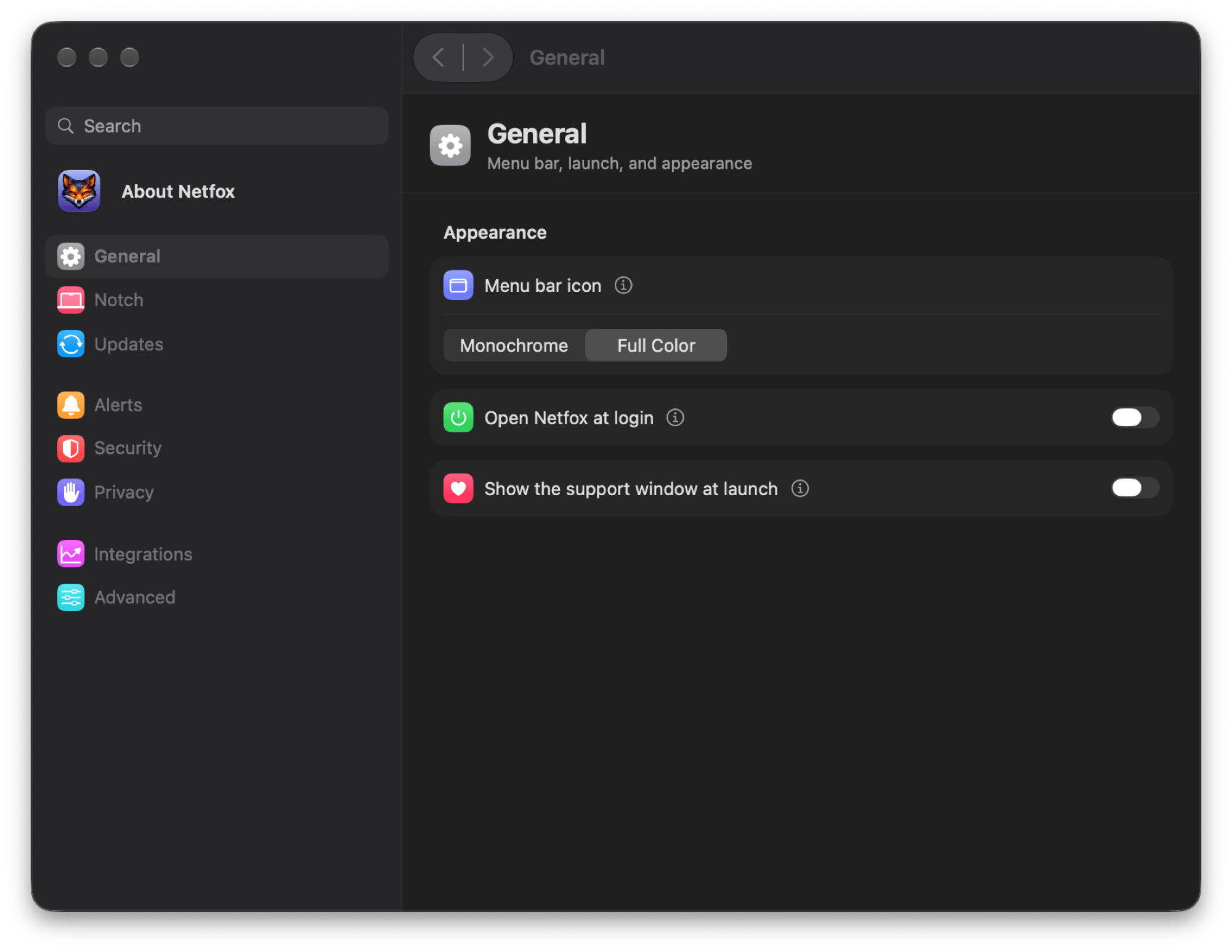
Settings that moves like System Settings (3 November). macOS 27 changed something without saying so: a keyboard shortcut attached to a button no longer fires, only one that lives in a menu does. So ⌘F and ⌘[ had been quietly doing nothing, and on Netfox’s Release Notes arrows they did nothing at all. In FinderGit 0.58.0, Lancetta 0.66.0 and Netfox 0.53.0 the shortcuts moved into the menus — Back and Forward on ⌘[ and ⌘], Search on ⌘F — and Settings gained back and forward arrows with the pane’s name beside them, the way System Settings has them. In Lancetta and Netfox that name is also the window’s title, so the Window menu says where you are, and the sidebar’s hide button is gone: hiding it only left you stuck. A side effect worth knowing: menus show each shortcut in your keyboard’s own keys, so on an Italian keyboard Back reads ⌘ò.
Netfox Goodies
A second way to help (6 November). Netfox is free, and it is staying that way. On the last day of this issue a small shop opened beside it: Netfox Goodies, a pack of things with the fox in it, for €5 once, VAT included, with no account and no subscription. Inside are three screen savers drawn by your Mac’s graphics processor — Netfox Drift 2.0, a flight through a luminous 3D world; Night Run, the pixel fox running through a landscape that follows your clock and your seasons; and Constellation, an invented network written in stars — with a preview app to try each one first. Then six wallpapers for Mac screens and four for the iPhone, five dynamic ones (Night Run’s follows the sun where you are, the other four turn from day to night with your Mac’s appearance), six video-call backgrounds and pixel-fox emoji for your chats. Your download page always serves the latest version of the pack, and its link comes by email, so you can come back for the next one. Every purchase helps keep Netfox free. The same evening Netfox 0.54.0 put the pack in the Help menu and in a card in the About window; the app sends nothing to the shop, and the page opens only when you click. And the licence had its first fix within hours. It allowed the emoji in the chats and workspaces you take part in, but its first two prohibitions — no uploading the files, no putting them in a service — read strictly, took that back, since adding a custom emoji to a workspace is both. Version 2 says in one sentence that they do not apply to the emoji. The screen savers need macOS 15.6 or later.

FinderGit
Safe with a repository you did not make (0.56.3 → 0.56.8). A repository’s own git settings can name programs that git starts by itself while answering an ordinary question, and the question the Agents page asks while it scans was enough to set one off. So opening Agents could run a stranger’s program as you, from any repository you had never vetted in a folder your coding agents had worked in. It came out of a security audit of Lancetta, which shares the dashboard’s code, and it took six releases in three days. Since 0.56.3 every git command Agents runs tells git to start none of those programs, and the one place Agents changes a repository — the fix that stops tracking a personal file — switches each of them off by name, or declines. The Open arrow beside an instructions file let macOS choose the app from what the file is, so a CLAUDE.md that was really a link to a script went to Terminal, which runs it: a repository could run its script on the click you made to read its instructions. 0.56.4 picks the app from the file’s name instead, and 0.56.5, the same day, finished the job, because the usual app for a kind of file can act on it too — on my Mac the app for .toml files was a terminal, Contacts imports a contact card, Calendar an invitation. Only Markdown, JSON, YAML and TOML now open in their usual apps, never in a terminal, and everything else in your plain-text editor. 0.56.6 stops a command once it has written 64 MB, where one that printed without end could fill FinderGit’s memory for up to thirty seconds. 0.56.7 leaves a fix out when the repository’s .gitignore or .gemini is a link: git refuses to read a linked .gitignore, so the fix did nothing useful there, but it still wrote — wherever the link pointed, outside the repository. And 0.56.8 took the first fix beyond Agents: just opening a repository you did not create, with FinderGit checking its status as you browse and fetching at start, could run its code without you doing anything. Each case was reproduced first, then covered by a test that fails without its fix. There is nothing to do but update.
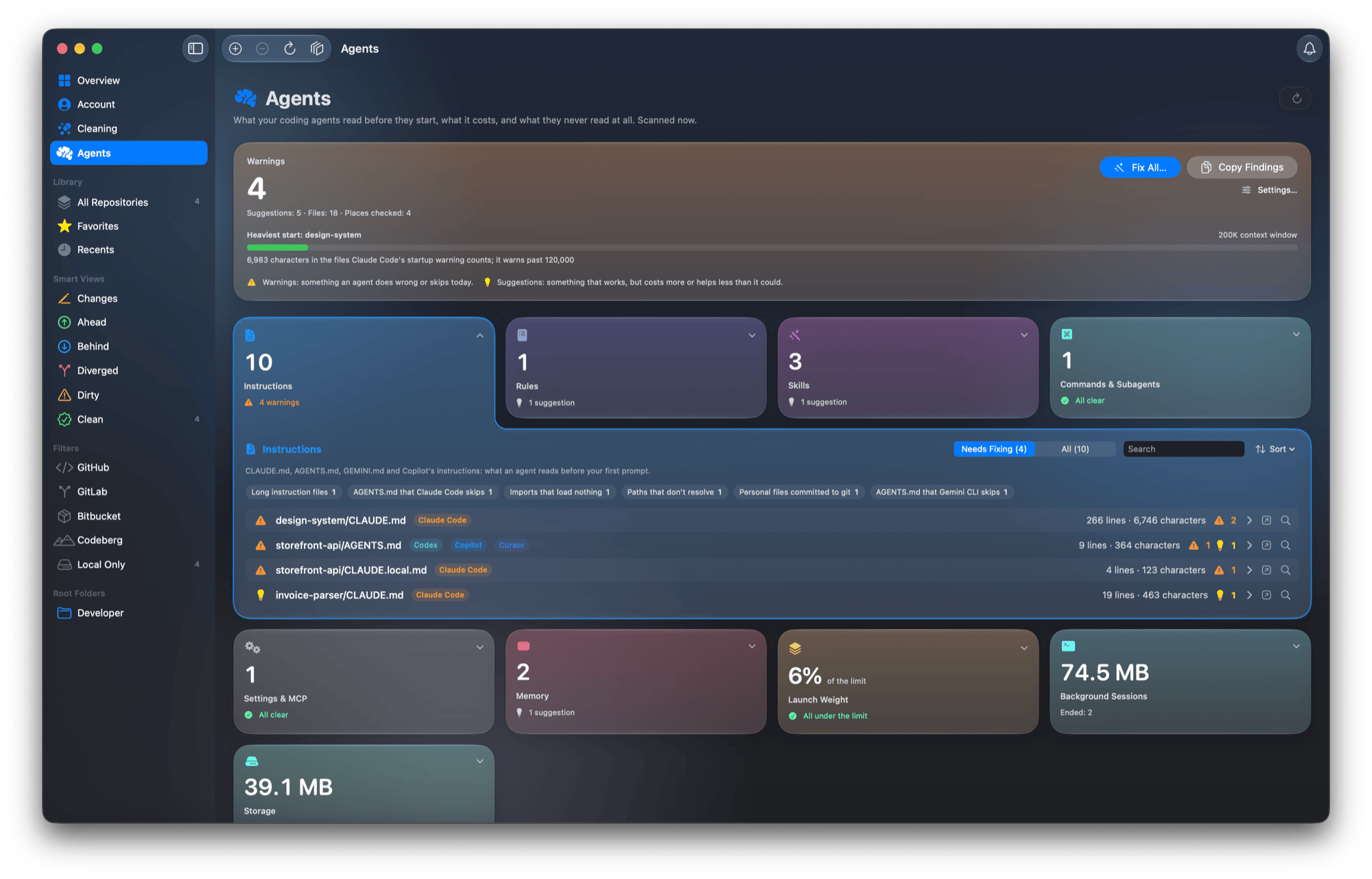
What your agents leave behind (0.54.0, 0.54.1, 0.55.0). Coding agents, and the tools they run, leave folders behind that nothing uses any more: a Codex runtime from an install that stopped halfway, every release of Codex’s background server, an interrupted marketplace update, the ChatGPT app’s temporary copies, an Xcode build cache inside an ended Claude Code background session, a clone left by a Chrome that was killed rather than quit. The Agents page’s new Storage card adds them up, each group saying what it is, what proves it unused and whether it comes back. Nothing in use is offered: FinderGit asks macOS which files running programs hold and marks those rows In use with the program’s name, every folder is checked again just before it moves, and it moves to the Trash, where the Finder can put it back. Then the unglamorous half. On a Mac with Time Machine the card read 0 bytes for every leftover, a 2 GB Codex install included, because macOS answers how much a deletion frees right now, leaving out the blocks a local snapshot still holds — and Time Machine takes those every hour. 0.54.1 counts that space, and says when part of it only comes back once the snapshots go, within a day. 0.55.0 keeps the card on screen, reading All clear, when there is nothing to free; before, on a tidy Mac, you never knew whether it had looked. The same releases read Claude Code’s settings the way Claude Code reads them: a settings file it silently drops whole, for a comment or a trailing comma, now gets a warning that says why; your organization’s policy is read from a managed profile too; and rules in a subfolder’s own .claude are listed with the folder they load in, instead of being ignored or counted at every start. Lancetta shipped the same card and the same reading on the same days.
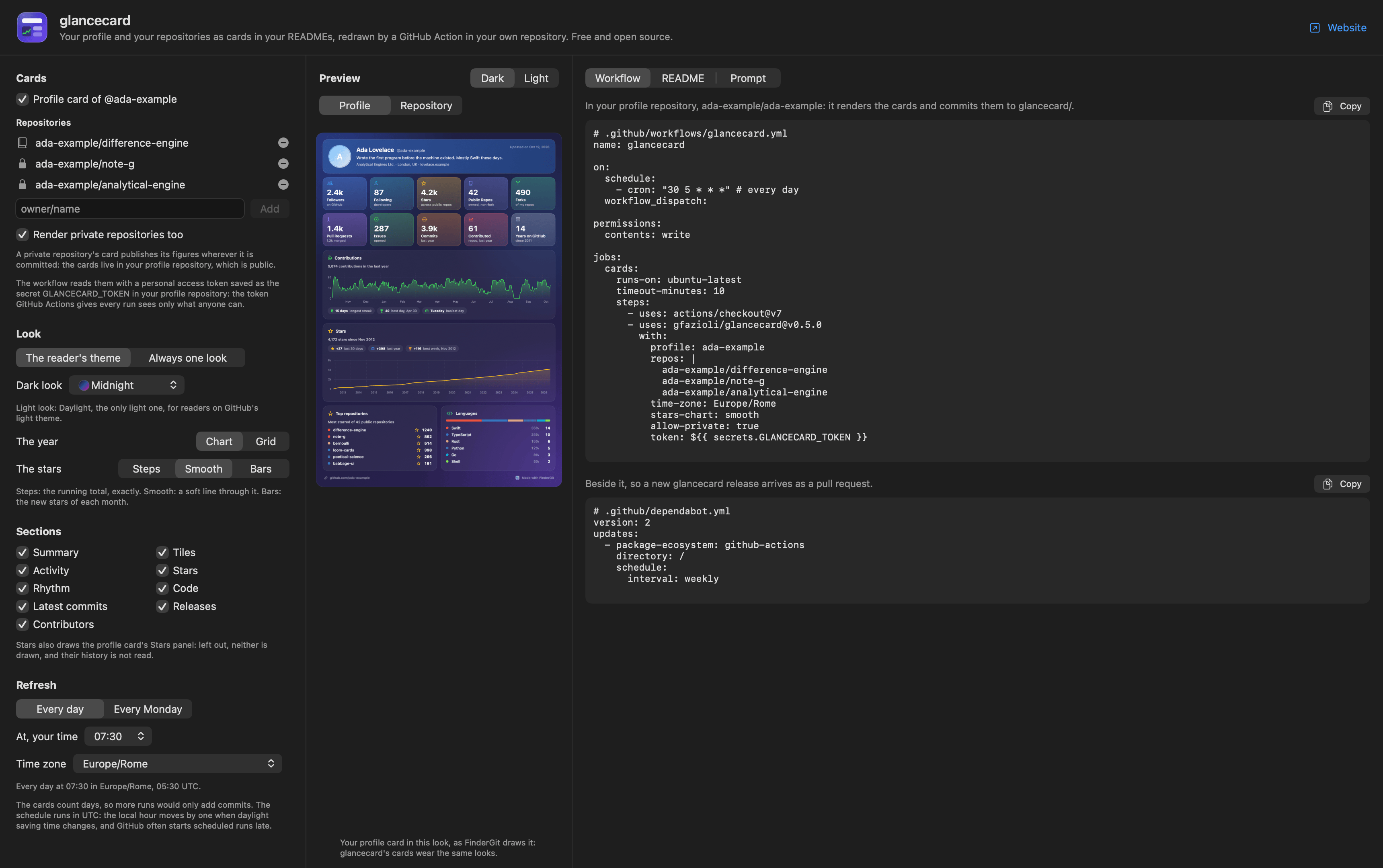
Your stars, and your card on your profile (0.53.0, 0.53.1). The Profile Card turned your GitHub profile into one picture, and a picture is a moment while a profile keeps moving. 0.53.0 adds a Stars panel — every star since the first, with the last 30 days, the last year and the best week — to each repository’s Overview and to the Profile Card, drawn as steps, a smooth line or bars. And Put It on Your GitHub Profile opens a window that sets up glancecard for you, the GitHub Action further down this issue that redraws the card in your profile README every day: pick the look, the sections and the hour, then copy the workflow or hand the job to Claude Code or Codex in one prompt. Its preview showed only the profile card, so ticking off eight of the nine sections, which belong to a repository card, visibly did nothing; 0.53.1 gives the preview a Repository side. The workflow you copied was right all along.
Rankings as charts, and an apology (0.56.0, 0.56.1). A list of six names tells you who is first, but not how big the first is. Largest on disk and Top starred on the Overview, Top repositories and Languages on the Account now open as a donut — the top six, the rest folded into a grey slice called Other, the total in the hole — or as bars, or as the plain list. 0.56.0 also shipped a crash. If the window animated while a ranking was updating, FinderGit could quit, and closing the What’s New card while the star counts were still loading, on the first launch after updating, was the likely way to get there: macOS 27’s chart drawing gives up when a donut’s data changes mid-animation. 0.56.1, the same day, stopped animating the donuts. A test now drives the real chart through that case hundreds of times in a row; before the fix it crashed every run, and since, it never has.
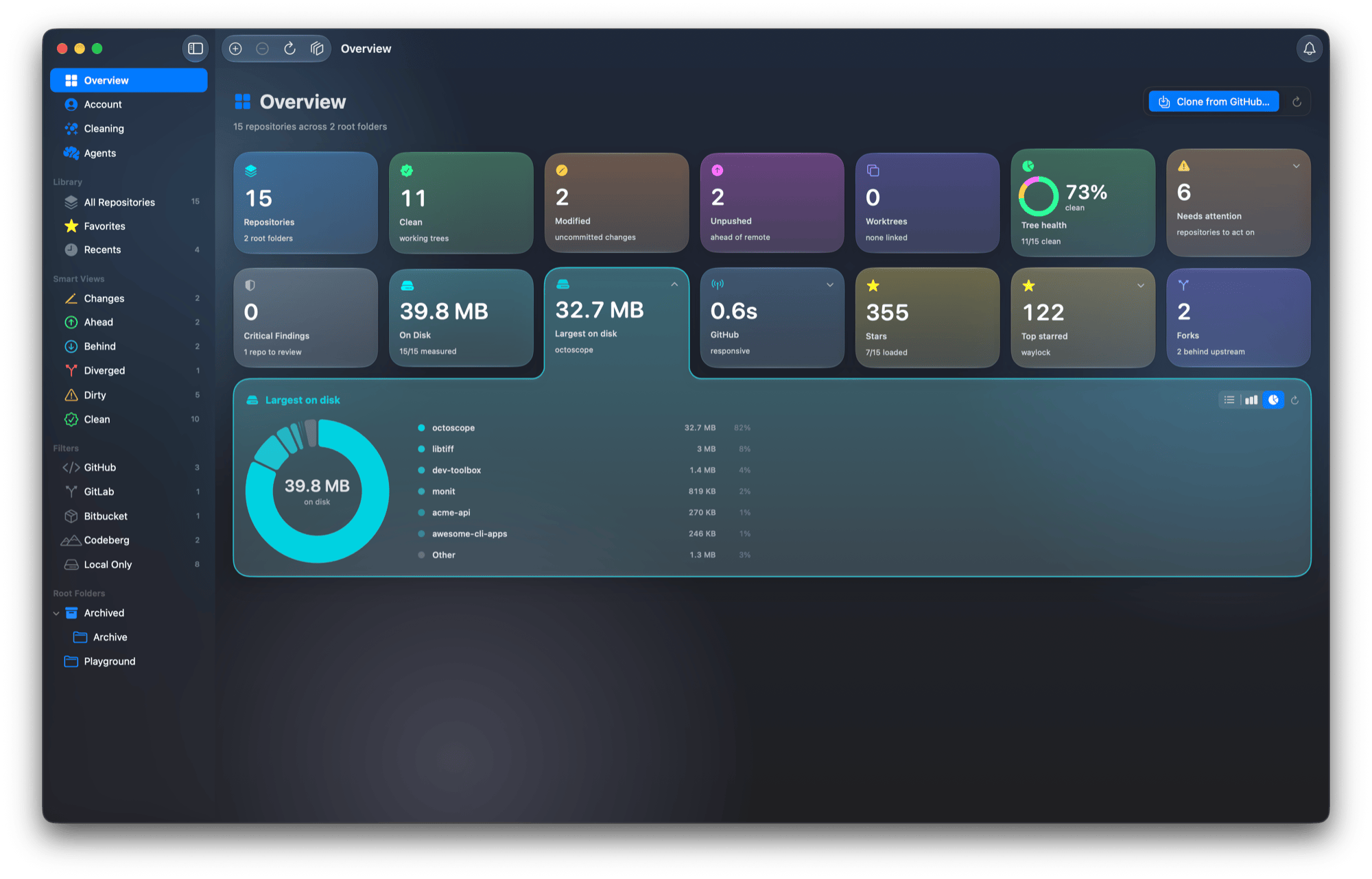
Codex sessions, and a Delete that means it (0.59.0). Every codex exec and codex review an agent runs is saved like a conversation you had yourself, and on my Mac they reached a couple of hundred in a few days. The last release of this issue gives the Agents page a Codex Sessions card that reads them from Codex itself and lays them out the way you would sort them: the task threads every review runs in, gathered in one row, then your conversations, then the sessions your commands started, then the ones already archived, each with its size on disk. Select Commands ticks what a command left behind and leaves your conversations alone. Archive is Codex’s own, undone by codex unarchive; Delete removes a session for good; and for either, FinderGit asks Codex to do it rather than touching Codex’s files. A session open in Codex or another program, or written to in the last hour, cannot be ticked, and each one is checked again right before Codex acts. Claude Code’s Background Sessions got the same pair: Remove has always kept the conversation, so claude --resume can open it again, and the new Delete also moves it to the Trash once nothing has it open. Two buttons side by side, one that keeps and one that throws away, sent me to read them in every language: in Spanish, French and Dutch they said the same thing. They no longer do, and a test makes sure they never will. Two smaller things came out of reading the website against the app: the Terms of Use and the Privacy Policy are in the Help menu and the About window, and the help for Show author avatars now says where the pictures come from — GitHub for a noreply commit address, Gravatar for everyone else, which receives a hash of the address rather than the address.
And the rest. 0.56.2 is about doing less. Left alone, FinderGit sits at 0.0–0.1% CPU, but with projects kept inside a folder that is itself a repository, every file save made it re-check the outer repository, usually twice; with a file saved every two seconds it now runs about a third of the git commands it did, and its CPU use fell from 3.7% to about 2%. 0.56.12 fixed a branch that shares its name with a tag — a release tag named after its branch, or a main tag pushed by accident — which showed up as heads/main, left you on a detached HEAD after Checkout, and could not be renamed or deleted. 0.57.0 lets sidebar groups hold groups, as deep as you like, Work › Clients › Acme, and deleting a group moves what was inside it up one level. And 0.58.0 gives the main window one history, as Finder has, with Overview, Account, Cleaning and Agents on ⌘1 to ⌘4. Twenty-one releases, 0.53.0 → 0.59.0, on macOS 15 or later.
Lancetta
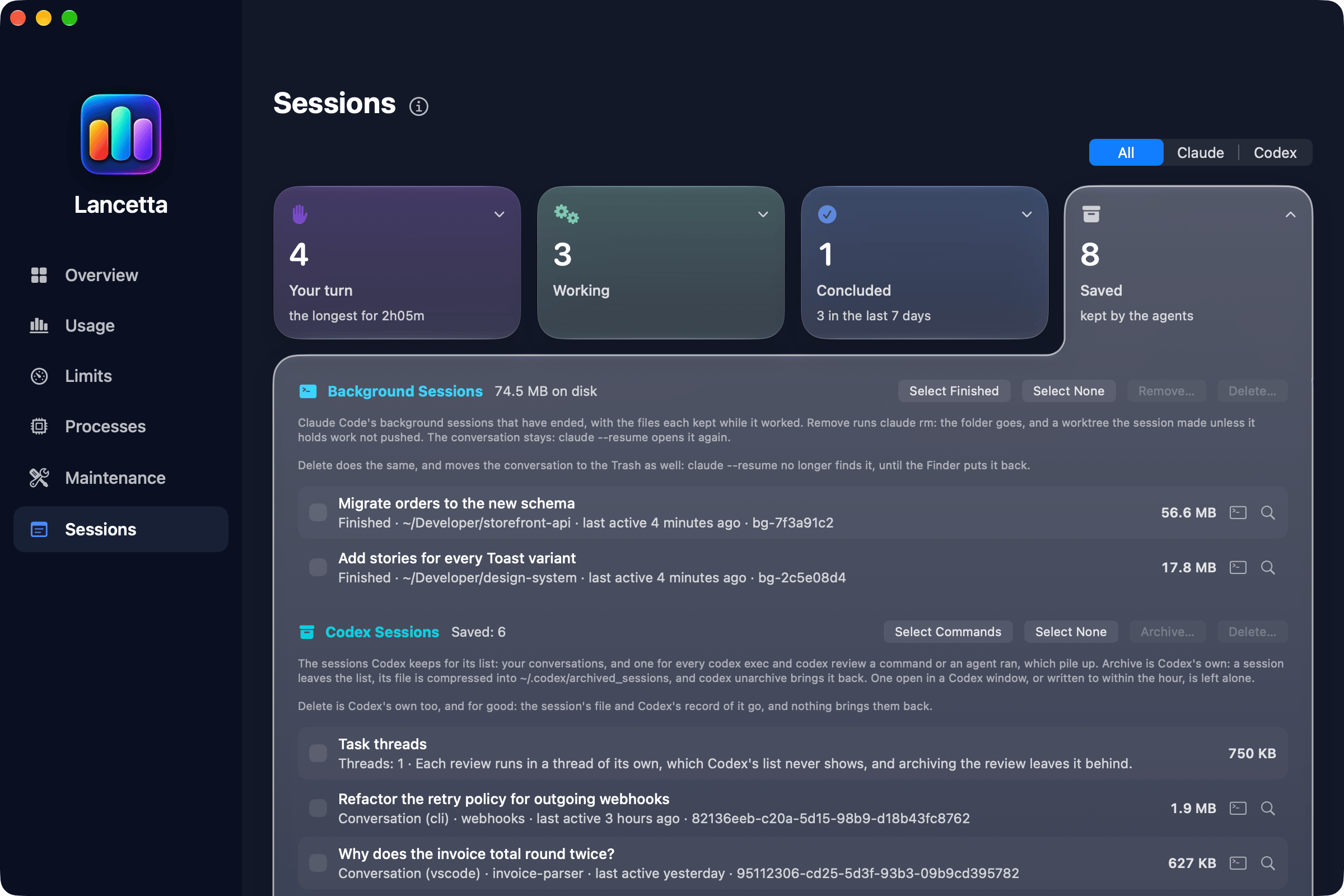
Every session in one place (0.60.0, 0.61.0, 0.67.0, 0.68.0). If you run a few coding-agent sessions at once, the work is rarely the hard part; remembering which one finished, which one is asking you something and which one you left an hour ago is. 0.60.0 adds Sessions: every Claude Code session you started, as a post-it in one of three places — Your turn, with how long the oldest has waited; Working; and Concluded, a record day by day — in the window, or behind a menu-bar item of its own that shows how many wait on you. It reads Claude Code’s own list and changes nothing in it, starts no session and costs no tokens; if the list cannot be read, every figure becomes a dash with a line saying why, because the rule Lancetta was built on is that an unknown is never a number. 0.61.0 put Codex’s sessions on the same wall, read without installing anything into Codex. Then the pile behind the wall. Every codex exec and codex review is saved like a conversation, and a review leaves a thread behind as well: on my Mac, 83 sessions and 71 review threads in nine days, which Codex archives one id at a time. 0.67.0 archives the ones commands and agents ran, never your conversations, through Codex itself, so codex unarchive brings any of them back. 0.68.0 gathers it all under Sessions in a fourth card, Saved — Claude Code’s ended background sessions, Codex’s saved and archived ones — with a switch for All, Claude or Codex. Any of them reopens in its folder or can be deleted for good, and most of the care went into what it refuses: Claude Code writes a conversation a line at a time, so a file nobody has open can still be a session at work, and Lancetta asks Claude Code itself whether a process stands behind it before removing anything, and again before the Trash. 0.68.0 also owned up to a wall that said too much: a session whose terminal had closed stayed in Your turn, as if waiting on you — on my Mac, 35 of them, the oldest 18 days old. A session that closes by itself now goes to Concluded, as Closed.
The audit, from Lancetta’s side (0.63.1 → 0.64.2). The security audit in FinderGit’s section began here, going through the whole app with one question: what could it leave behind, or let in, that you would not expect. Lancetta got the same fixes on the same days — git runs no program a repository names (0.63.1), Open shows a file and never runs it (0.63.2, 0.63.3), a fix writes only inside its repository (0.64.2) — and two of its own. Lancetta reads your Claude quota with the sign-in Claude Code keeps in your keychain, so it never spends a token to find out how much is left, and every reading had been leaving a copy of that request, sign-in included, in Lancetta’s cache folder on disk. Nothing broke and nothing looked wrong, which is exactly why it had to go: since 0.63.1 the request keeps nothing on disk, and the copy an earlier version left is deleted the first time Lancetta starts. It also loads only code signed by Apple or by me. And Lancetta reads Codex by starting it and reading its answer — all of it, so a broken install, or a wrapper you had set in Settings, could fill its memory for up to thirty seconds at every reading. 0.64.1 stops at 16 MB, thousands of times what a reading takes, and says so on the card as CODEX-8; under a deliberate flood the app went from 3.2 GB to 15 MB. The downloaded app no longer listens to a developer setting that names another program to run instead of Codex, either. Nothing to do on your side.
Claude’s Ultra plan, read as what it is (0.65.0, 0.65.1). At the end of October Claude’s top plan changed name, from Max 20x to Ultra, and a verified Ultra account has no 5-hour limit any more, only the weekly ones. Lancetta did not take it well. Its oldest rule is that a number it could not read is never shown as a number, so on Ultra the menu bar showed a grey lamp with nothing beside it, all day, and every card a 5-hour row with a dash in it: right by the rule, useless in practice. Since 0.65.0 a number Lancetta failed to read is still unknown, but a window your plan simply does not have is said as exactly that. The menu bar reads the week, with a reset counted in days; the panel, the Limits pane, the notch and the widgets drop the 5-hour row; and the run-out warning comes for the week. 0.65.1 is for whoever reads Claude the old way, from a file a line in the status-line script writes: on Ultra that line is never handed the 5-hour figure, so the file stops moving, and the card now says so and offers Connect, which reads the account instead.
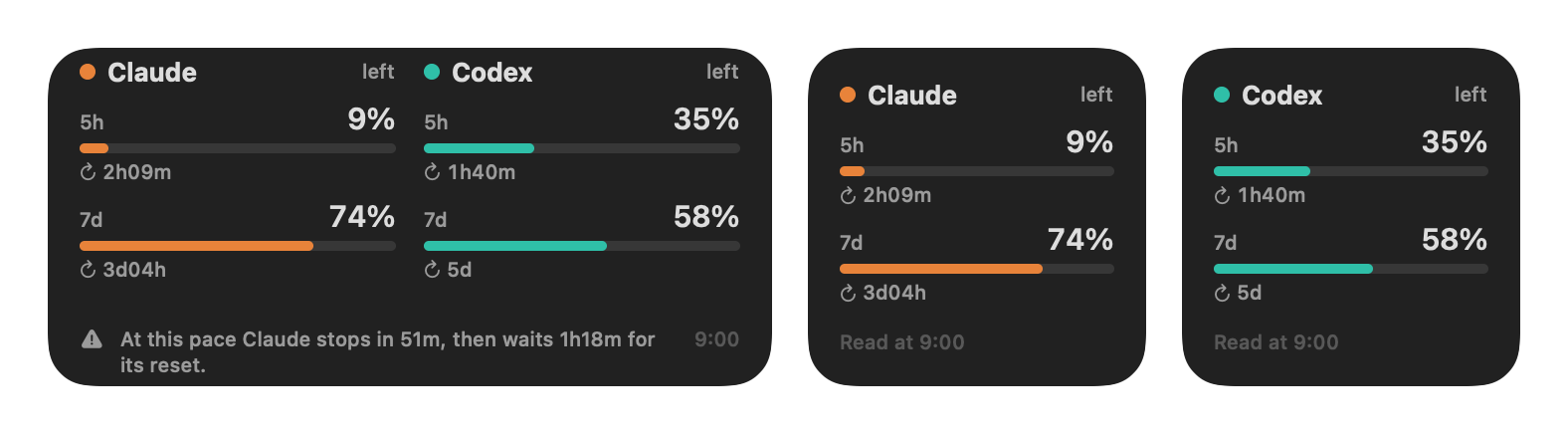
Where your pace lands, and a widget (0.61.0, 0.64.0). A percentage says what is gone; what you want to know is whether this pace carries you to the reset. Since 0.61.0 the panel draws a faint ghost carrying the 5-hour bar on to where the last hour’s rate leaves it at the reset, amber only when that pace would stop you first, with five other pictures to choose from in Settings, and the Limits pane charts the week beside the last one, with a stretch the Mac slept through drawn as a gap, never a flat line. The same release brought a lancetta command and an Agent Skill, so Claude Code or Codex can check how much room is left before a long task and tell you in a sentence. 0.64.0 puts Lancetta on the desktop: a small widget for each agent, and a medium one with both side by side and the suggestion that matters. A widget that only showed a number would sooner or later show an old one as if it were current — the one mistake Lancetta was built never to make — so each says when it was read, a window that has reset since shows a dash, numbers over an hour old turn faint, and nothing relies on colour alone, since macOS drains a widget’s colour when a window is in front. The widgets read nothing themselves: Lancetta hands them the panel’s own numbers.
And the rest. Maintenance gained the Storage card and the Claude Code reading told in FinderGit’s section, Time Machine bug and all (0.62.0 → 0.63.0). And 0.68.1 started from reading Lancetta’s own documentation against the app, line by line: when Lancetta cannot read Claude Code’s sign-in without asking macOS for a permission, which it never does behind your back, the card told you to press Reconnect — a button that exists nowhere. It now names the one you see, Connect Claude Code…, in all seven languages. 0.68.2, the next day, read the Saved card’s two buttons side by side: Remove takes an ended background session off the list and keeps the conversation for claude --resume, Delete also moves the conversation to the Trash, and in Spanish, French and Dutch the two, their confirmations and their notices had been worded alike. They now read Quitar and Eliminar, Retirer and Supprimer, Verwijder and Wis. Twenty-one releases, 0.60.0 → 0.68.2, straight on from 0.54.0 with nothing in between to go looking for; free, signed and notarised, on macOS 15 or later.
Netfox
A connection that stalls (0.52.0). This release started with my own Wi-Fi. One afternoon in October the network felt slow for a few minutes, and Netfox’s Link card said everything was fine. It judged each round of pings by its fastest reply, which shrugs off one unlucky packet but misses a radio that stalls: the fastest reply stayed at 2.7 ms while a quarter of the pings came back hundreds of milliseconds late, the radio stalling for half a second every couple of seconds. The card now keeps the last three rounds, counts the replies that came back more than 100 ms after the fastest, and when that reaches 15% it says so, and by how much: The router answers in 3.0 ms, but 24% of the pings came back over 100 ms late — the first hop is stalling. It waits for two rounds before saying anything, so one late reply never becomes a warning, and when the router answers steadily and only the path beyond it stalls, it says the delay is past the router, so you know it is not your Wi-Fi. A single lost ping among twenty no longer marks the router as flaky — it takes one in ten — and if one way of discovering devices cannot start, the others keep running instead of discovery stopping altogether.
Your network stays on your Mac (0.52.1). A quiet security update. The optional metrics endpoint in Settings → Integrations, for feeding your own dashboards, now answers only the monitoring tools running on your Mac and turns away a web page you happen to have open in a browser, so the picture of your network it serves cannot be read from the web. The part that checks for updates was hardened too, and your network’s public-facing address no longer lingers in a cache on disk.
Keeping its word on your data (0.53.1). A privacy policy is a promise, and this release came out of reading Netfox’s website against the app, privacy page included. Netfox keeps a short memory of your network on your Mac — each device’s timeline for 30 days, a week of Wi-Fi and latency readings, the names devices announce about themselves for 90 days — and the policy says so. What it did not say is when those windows were enforced: most of Netfox’s stores tidied themselves only when they wrote something new. On a busy network that happens every minute; on a quiet one it might not happen at all, so a network you stopped probing kept its old port results, and a Mac that stopped scanning Wi-Fi kept a week-old picture of the neighbourhood, access points included. Every store now clears what has passed its time when Netfox starts as well as when it writes, and the privacy page says exactly that, with its one exception: an old port reading that a newer one replaced stays until the newer one expires, because that is how each port keeps its last known state. Demo Mode’s help now lists everything it hides before a screenshot, Wi-Fi network names and IPv6 addresses included, and the Terms of Use and the Privacy Policy are in the Help menu and the About window.
Small things, set right (0.51.1, 0.51.2). VoiceOver read a port with a finding as Medium risk risk finding, and spoke the count of devices at risk in English whatever your Mac’s language; both are fixed. Opening a card on Overview or Security no longer rebuilds everything inside it, and the three cards at the foot of the About window line up in every language — in Spanish and Portuguese, FinderGit’s description had lost its last words to an ellipsis. In the sidebar the selected tool’s icon now turns white on the blue selection, where the Overview’s indigo had all but vanished, and in Italian the Overview is Panoramica everywhere, no longer Generale, the word the General tabs already used. Ten releases, 0.51.1 → 0.54.0, on macOS 15.6 or later; 0.52.2 → 0.53.0 are the install window, the move to Applications, the sponsors wall and Settings at the top of this issue, and 0.54.0 is the way to Netfox Goodies.
glancecard
Every star, since the first (0.4.0, 0.5.0). A star is the smallest thing anyone can give a project, and the number most of us check first; until now a card told you how many. Since 0.4.0 it tells you when they came: a Stars panel on both cards draws the running total since the repository was created, with the last 30 days, the last year and the best week above it. It could not be done before. Star-history charts were built on the list of who starred a repository, and this summer GitHub made that list visible only to a repository’s admins and collaborators; in August it opened the star history itself, counts rather than people, which glancecard reads with the token your workflow already has. The first run reads each repository’s whole history — 427 requests for my 69 repositories, back to 2011 — and keeps it beside the cards in .stars.json, so every run after that asks only for the newest weeks, one request per repository. Checking it against the exact timestamps of my own stars turned up one surprise: GitHub counts those days in Pacific time, so a star given on a European morning can land on the day before, and glancecard leaves it where GitHub puts it. The same afternoon 0.5.0 let you choose how the stars are drawn — steps, the running total exactly; smooth; or bars, the new stars of each month — and the website’s Make it yours now draws the card your choices make, with glancecard’s own renderer, before you copy anything.
Every look, both sides (0.6.0). The looks used to live at night: put Halloween on your README, and readers on GitHub’s light theme got Daylight, whatever look you had picked. Every dark look but Midnight, whose light side has always been Daylight, now has one of its own — nebula-light, halloween-light and five more — drawn from the dark one by a rule that darkens every accent until it reads at 4.5:1, then finished by hand where a rule cannot know, like snow that would vanish on paper. Pair a look with its light side and GitHub shows each reader the one that matches their theme.
Every tile holds what it says (0.6.1). Moving the WP Bones cards from Halloween to Bridge, I caught one of them breaking the promise a card makes: pure-css-tabs’s License tile read BSD-2-Clau, the rest of the word run off the card — and so did the card of every one of the nine WP Bones packages under BSD-2-Clause, in every look. The tile now shows the licence’s family as its figure and the full SPDX id underneath, and a figure or label too wide for its tile is set a little smaller before it is ever clipped. Of the twenty cards the tests hold byte for byte, one changed. Four releases, 0.4.0 → 0.6.1; there is still no moving v0 tag, so you upgrade by pinning gfazioli/glancecard@v0.6.1, or by merging the pull request Dependabot opens.
gfazioli.github.io/glancecard · GitHub Marketplace
macOS Tweaks, for Raycast
Dock spacers, and a tweak that did nothing (16 and 19 October). Sergey Filkov, a reader of an article about the extension, suggested Dock spacers — empty tiles that split the Dock into groups — and the new Add Dock Spacer command adds one, small or regular, among the apps or on the documents side; you drag it into place, and drag it out of the Dock to remove it. Browse Tweaks gained a Dock Spacers row that counts them, adds any of the four kinds and removes them all without touching your apps and folders: after adding and removing four, the Dock’s two lists of tiles came back byte for byte as they were. The update before it added Dim Hidden Apps, which makes the icon of an app hidden with ⌘H translucent, checked on macOS 27.0.1 before it went in — and removed Disable .DS_Store on USB Volumes, because macOS 27 does not read its key at all: the toggle wrote a setting nothing reads. If you had turned it on, the leftover is harmless, and defaults delete com.apple.desktopservices DSDontWriteUSBStores removes it. The catalogue stays at 129 tweaks.
raycast.com/Undolog/macos-tweaks
octoscope
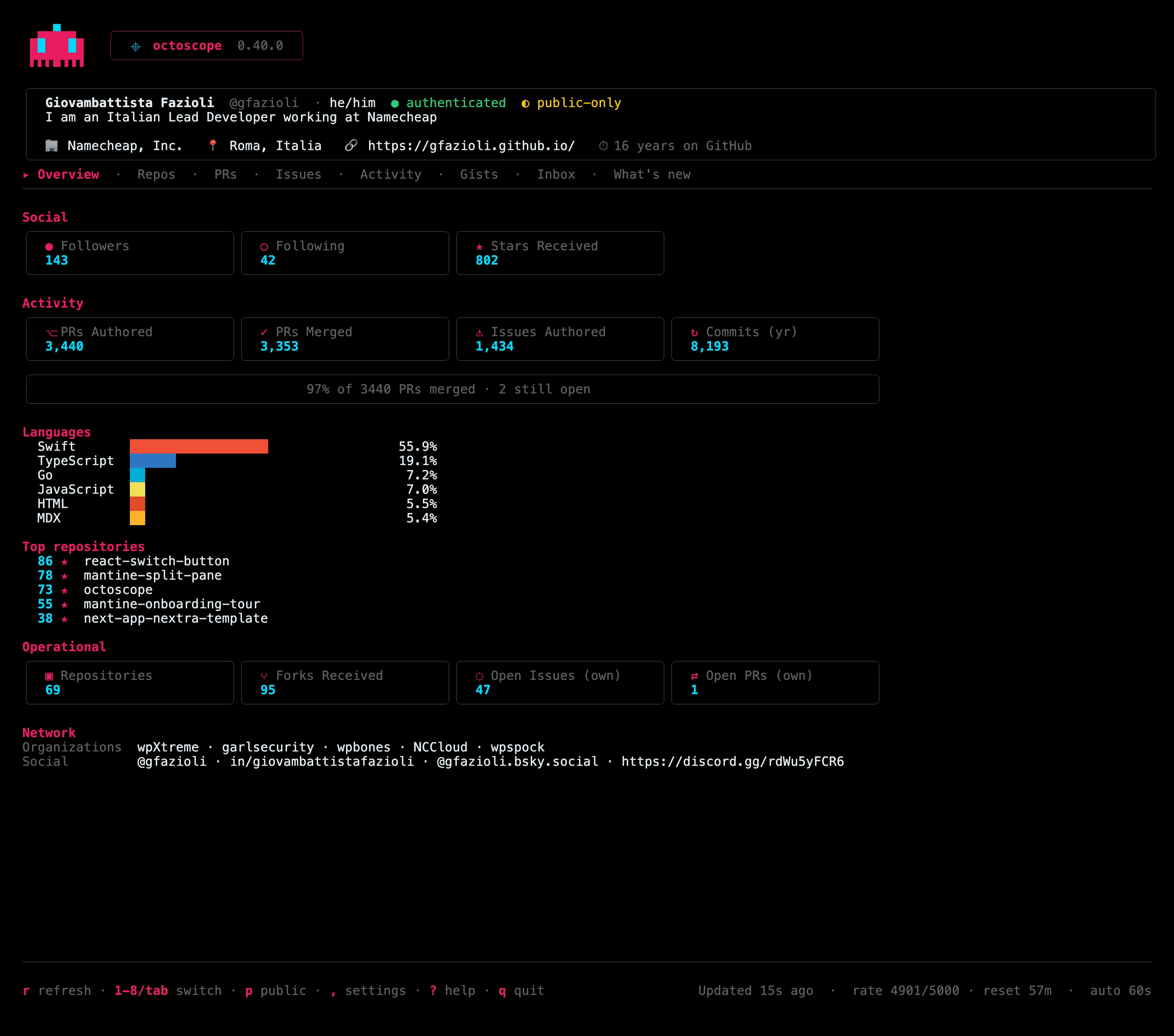
Archived repositories stop counting as work (0.40.0). This release started with someone else’s idea. @soulchainer opened an issue: archived repositories were still counted in the Overview’s open issues and pull requests, as if they were waiting on you — and since GitHub makes an archived repository read-only, that was a number no amount of work could bring down. A week later they sent the pull request that fixes it, complete with the docs and the tests, and 0.40.0 is the first octoscope release with code from the community. Open Issues (own) and Open PRs (own) now count only the repositories you can still act on, while stars, forks and the repository count still include archived ones: archiving a repository takes back none of its stars. Archived repositories carry a muted Archived tag, the PRs open and CI broken work filters skip them while stale 90d still lists them — it asks what has gone quiet, and an archived repository has — and --json marks every repository as archived or not. It is also built with Go 1.26.10, which fixes a security advisory in Go’s standard library. If you have an idea for octoscope, issues and pull requests are open.
https://gfazioli.github.io/octoscope · brew upgrade gfazioli/tap/octoscope
Mantine extensions
Three alignment sweeps moved all 26 to Mantine 9.7.3 on the 22nd, 9.7.4 on the 26th and 9.7.5 on 6 November, one patch each, 78 in all, with the peer ranges unchanged and nothing for you to do. The first went out after a security pass on the repositories’ build and docs tooling, which took each repository from 12 open Dependabot alerts, 2 of them critical, to 2 with no published fix; none of them was in the published packages. The extensions site and the two documentation templates moved with the sweeps, and the site’s search now links to pages rather than to their .html files.
Onboarding Tour lands where it aims (4.1.6). The one component release of its own, the same day as the last sweep. The tour’s reveal scroll is a fork of Mantine’s own scroll-into-view hook, and it carried the bug Mantine 9.7.5 had just fixed upstream: the animation’s progress was never capped, so the last frame, landing past the set duration, fed the easing a value above 1 and the scroll stopped short. A pixel or two at the default durations; with a short reveal, the step’s target could end up well off screen. Progress is now capped at 1, as upstream does, with upstream’s regression tests brought over.
And the rest
No WP Bones, Bannerize or Scotty release, and no React library this time; the last release of each still stands. The new sponsor’s face also went up on the sponsors walls of gfazioli.github.io, the Mantine extensions site and the React libraries’ READMEs.
Undolog — open source studio. Every project in one place: gfazioli.github.io · this newsletter lives at undolog.com
FinderGit — a Git-aware file browser for macOS · findergit.app
Lancetta — a menu-bar monitor for the quotas of Codex and Claude Code · lancetta.app
Netfox — a network monitor for macOS · netfox.app
octoscope — a terminal dashboard for GitHub · gfazioli.github.io/octoscope
glancecard — daily SVG cards of your GitHub profile and repositories, for your READMEs · gfazioli.github.io/glancecard
WP Bones — a Laravel-style framework for WordPress plugins, with Bannerize and Scotty built on it · wpbones.com
Mantine extensions — 26 components on npm · mantine-extensions.vercel.app
Raycast extensions — for the Raycast launcher · raycast.com/Undolog