


Two weeks, fifty-four releases across seven products — one of them brand new, three of them new to this newsletter — plus a Mantine alignment across all 26 components and one Raycast contribution. The thread this time is one Netfox put in a release title, and once you have seen it you find it everywhere: what a program writes down when it gets no answer. Left to itself, it writes down the most reassuring thing available. A device went to sleep and said nothing, and Netfox wrote every one of its open ports down as filtered — so an exposed Telnet port quietly stopped counting as a risk. An account refused Lancetta without saying how long to wait, and Lancetta read the missing number as a wait of zero seconds. A WordPress build failed, and the command that ran it printed ✅ Build completed. Most of this fortnight went into teaching tools to tell nothing happened from nobody answered — and, where they can, to go and ask.
Lancetta
Lancetta is new, and this is its first appearance here: a native macOS menu-bar monitor for the quotas of Codex and Claude Code — the 5-hour and the weekly window for each agent, when each one resets, and where it is heading at the pace you are going. Reading a quota costs nothing, and that was measured rather than promised: twelve reads left the account’s lifetime token counter unchanged at 318,009,023, against a day of ordinary use that moved the same counter by 29,188,602. It is free, universal, signed and notarised, and runs on macOS 15 or later. The first public release, 0.2.0, went out on 18 September and 0.13.1 on the 30th. Twenty-three releases in thirteen days is too many to list, so here is their shape.
An unknown is never a number (0.2.0 → 0.3.4). The app exists because of one status line. It showed 0% when it had no reading at all, and a three-hour-old number as though it were current — not an error, not a blank, but a confident, wrong number you plan your afternoon around. So Lancetta never draws an unknown as 0%, and every reading carries its age. Launch day went the way launch days go: 0.2.0 shipped with only the Apple silicon slice while the site said Universal, and 0.2.1 fixed it the same day. The moment a quota monitor earns its place is when an agent refuses you, and that is the moment the first builds handled worst — the whole bar collapsed into one anonymous sign that read as a minus. A refusal is now a cell of its own, with the agent’s mark, the window that refused and a countdown, while the other agents keep their turn (0.3.2). An error that used to print raw JSON as the entire Codex card — it told the developer everything and the person nothing — now arrives as one sentence with a Why, and what to do… behind it (0.3.3).
Claude stays connected (0.3.4 → 0.11.1). Claude Code rewrites its keychain item every time it renews its sign-in, and the rewrite wipes the permission you gave anyone else to read it. So macOS kept asking for your login password in the background — six times in three days, with four Always Allow grants wiped within the hour of being given. 0.3.4 stopped the dialog appearing on its own; 0.11.1 reads the sign-in the way Claude Code itself does, and normally there is no dialog at all, not even the first time. The permission was never going to last, however many times you granted it. And the pause from the opening paragraph: the account sends that refusal with no wait attached, and the card sat stuck for a minute and a half at a time. It retries after ten seconds, then twenty, then forty (0.6.2).
The number you can already see is not the useful one (0.4.0 → 0.8.0). A percentage cannot tell you whether today’s pace empties the window before it resets. A line under every bar now says it — 55% in 2 days · at this pace full by Wednesday afternoon — and turns amber only when the window would run out early. It shipped against a verdict fixed in advance: if 1,890 readings across twenty-five windows showed the quota draining as a slope, the feature would be deleted rather than softened. It came back a step — the sharpest boundary went from 100% to zero in forty-two seconds. From there: notifications only for what the bar cannot show, each said once at the moment it changes and never on launch (0.5.0); a model’s own weekly limit, which the account had been sending all along while Lancetta drew 65% and said nothing (0.6.0, 0.7.0); and a menu-bar lamp that goes green, amber and red — and grey when nothing could be read, because an unknown is not an empty quota (0.8.0).
The menu became a panel (0.9.0 → 0.11.0). You can pin it, drag it, and close it only with Escape. Durations now follow one rule: an hour and four minutes had been printing as 64m, and a day and eight minutes as 24h08m, since the app first shipped. The panel went from seven controls in three places to five in two, with Updated 14s ago across the top and a card’s own age shown only when it trails (0.10.0). And 0.11.0 shows the free reset Codex sometimes grants — the one thing in Lancetta that cannot be undone, so Use… always asks first, with two dates and Cancel as the default.
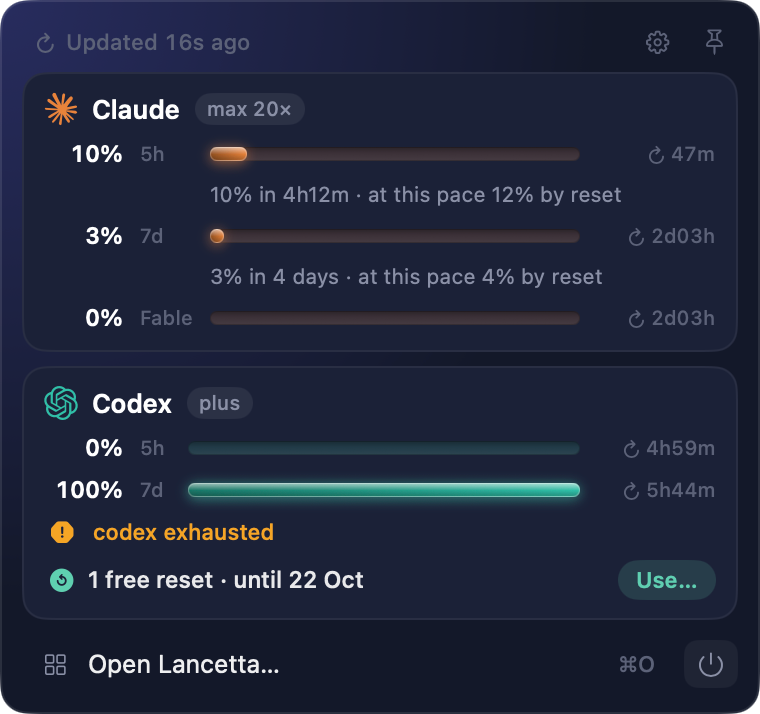
The Lancetta panel: Updated 16s ago across the top; Claude at 10% of its 5-hour window and 3% of its week, each with a line saying where it ends at the current pace, and its Fable limit at 0%; Codex spent for the week, with the free reset it holds until 22 October and a Use… button
Looking back, and everyone else’s Mac (0.12.0 → 0.13.1). A Last week card per agent says how the weekly window ran, how often the 5-hour one stopped you, and the hours nobody read — a night your Mac spent asleep is a gap, never a zero, and the card waits for one whole week before it says anything. Lancetta usage --json prints the last reading for a tmux status line or SketchyBar, and never reads an agent itself. Then 0.13.0, for machines that are not mine: an agent that is installed but not found looks exactly like one that is not installed, so a Sources pane now shows the binary, how it was found and every place searched. On macOS 27 the app had been drawing macOS 15’s controls, because Lancetta was telling macOS it had been built for macOS 15, and macOS believed it. And 0.13.1 fixed the Processes pane announcing 4 Codex trees · 1.45 GB directly above No Codex process trees are running.
https://lancetta.app
WordPress: WP Bones, Bannerize and Scotty
New to this newsletter, and not quiet about it: WP Bones, my Laravel-style framework for WordPress plugins, shipped ten releases (2.0.4 → 2.1.0), and two plugins built on it followed — Bannerize (1.13.3, 1.13.4, 2.0.0) and Scotty (2.2.0). The 14 boilerplates and their Playground demos moved with every framework release, so they get this sentence rather than fourteen paragraphs.
The command every plugin carries, read line by line (2.0.10). Every WP Bones plugin ships bones, a single PHP file you run for make:controller, version, deploy and the rest. This fortnight it was read end to end and then broken on purpose. The one that could not wait: php bones deploy <path> deleted whatever was at <path> before copying, and a five-second pause was all that stood in the way — so php bones deploy .. emptied the parent folder, every plugin beside yours and then the plugin itself. php bones deploy build went the other way, copying the plugin into its own build/, then build/build/, until the path was 160 levels deep. The deploy now checks the destination before it builds anything, and the plugin, any folder containing it and any folder inside it are always refused.
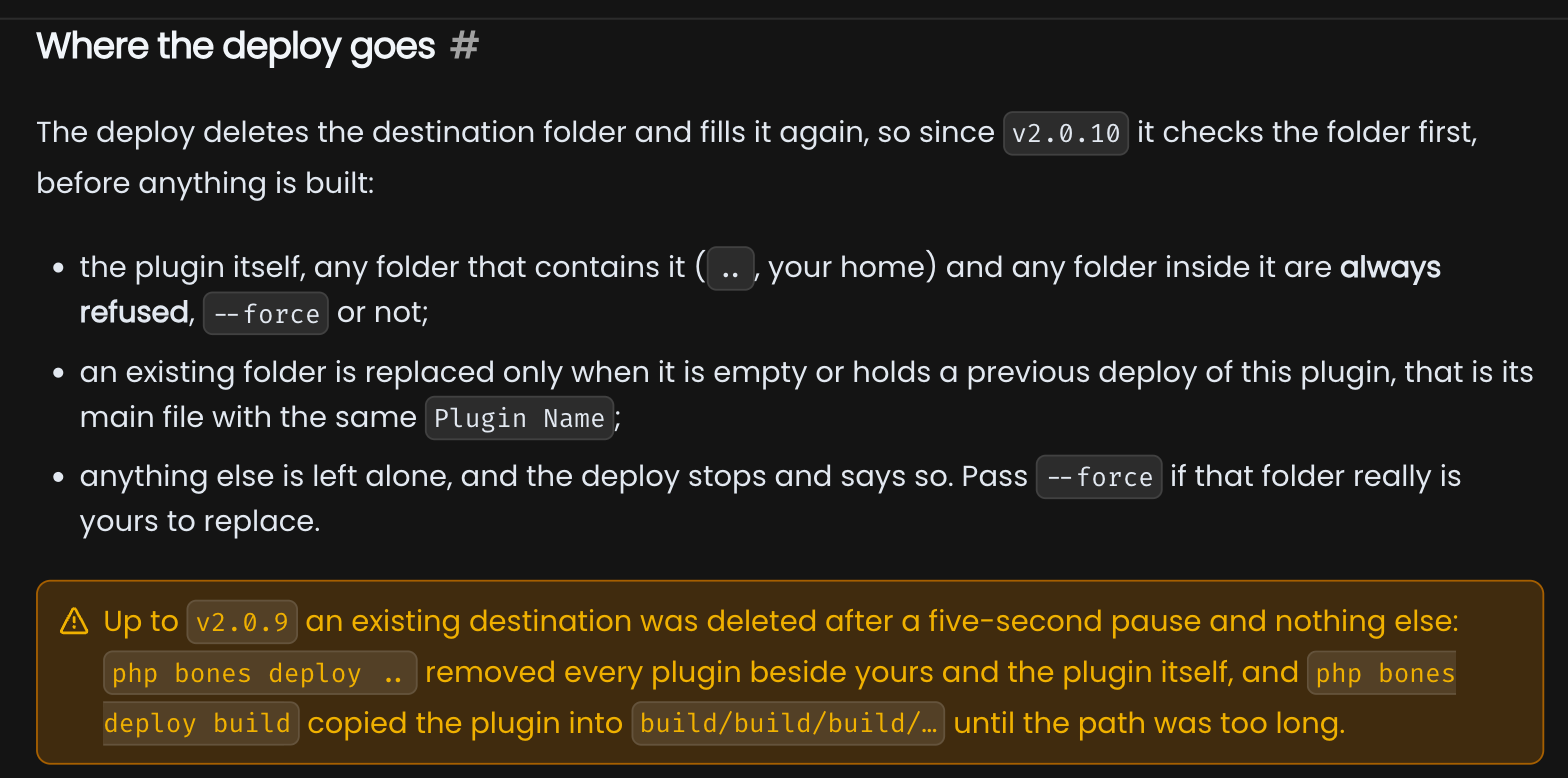
The Where the deploy goes section of the WP Bones docs: the plugin, any folder that contains it and any folder inside it are always refused, an existing folder is replaced only when it holds a previous deploy of the same plugin, and a warning that up to v2.0.9 php bones deploy .. removed every plugin beside yours
Success, reported by things that had failed (2.0.6 → 2.1.0). The rest of the audit reads like a catalogue of this issue’s thread. A broken production build printed ✅ Build completed, packaged whatever was already in public/ and exited 0. bones version announced Version updated while package.json kept the old number. The make:* generators said Created when the write had failed. An unknown command, a missing name and a prompt you answered “no” all exited 0, so a script could not tell any of them from success. And the format:check script the v2 migration writes called a formatter that ignores --check and always writes — so the “check” reformatted the plugin, compiled bundles included, and reported success. Each of them now fails like a failure. rename got the same treatment in 2.1.0: on the Internationalization boilerplate it wrote 187 files, 99 of them identical to what they had been, and corrupted the compiled .mo catalogues on the way, because a longer plugin id shifts every string while the offset table stays put.
A number that should have been zero (2.0.7). Checking what bones deploy would send to the WordPress.org plugin directory, PHPUnit was in the package — with Brain Monkey, Mockery and everything else a test suite pulls in: 31 packages nobody needs on a live site. The deploy now drops Composer’s dev packages in the copy, never in your checkout, and stops outright when it has no lockfile to do it with: a loud failure beats a quietly heavy package. The next release came from a contributor’s pull request, and gives every custom bones command its plugin — the same instance WordPress is already running (2.0.8).
Eloquent, on the database WordPress actually uses (2.0.11, 2.0.12). Open the Database boilerplate’s demo on WordPress Playground, click Eloquent ORM, and the page stopped after its first example, with the error tucked inside a collapsed Output. Eloquent always opened a MySQL connection, and Playground runs WordPress on SQLite; it now uses the same SQLite file WordPress does — Playground, WordPress Studio, any site on the SQLite plugin. Reading the other half of that function found two more: on MySQL 8.4 an emoji saved through Eloquent failed with error 3988, and an emoji saved by WordPress came back through Eloquent as a question mark, with no error at all. Charset, collation and DB_HOST parsing now come from WordPress itself.
Bannerize: a new foundation, and a security release for everyone else (1.13.4, 2.0.0). 2.0.0 moves Bannerize onto WP Bones 2 and needs PHP 8.1 and WordPress 6.6; on screen, nothing changes. Sites that cannot follow stay on 1.13.4 — and 1.13.4 is where this cycle’s security work went, so it is worth installing today: the shortcode’s order option reached the database unchecked, which let anyone who can write a post, Contributors included, run SQL of their own. It also fixes a bug you may have seen without knowing why: a banner with a maximum number of impressions or clicks refused to appear until you opened the banner list in the admin, then vanished again after the next analytics cleanup. A week earlier, 1.13.3 fixed a shortcode naming a campaign that could not be found: it rendered an empty container with no notice and no log entry, indistinguishable from a campaign that simply had no banners. Now it renders nothing, and says why in an HTML comment and a developer notice.
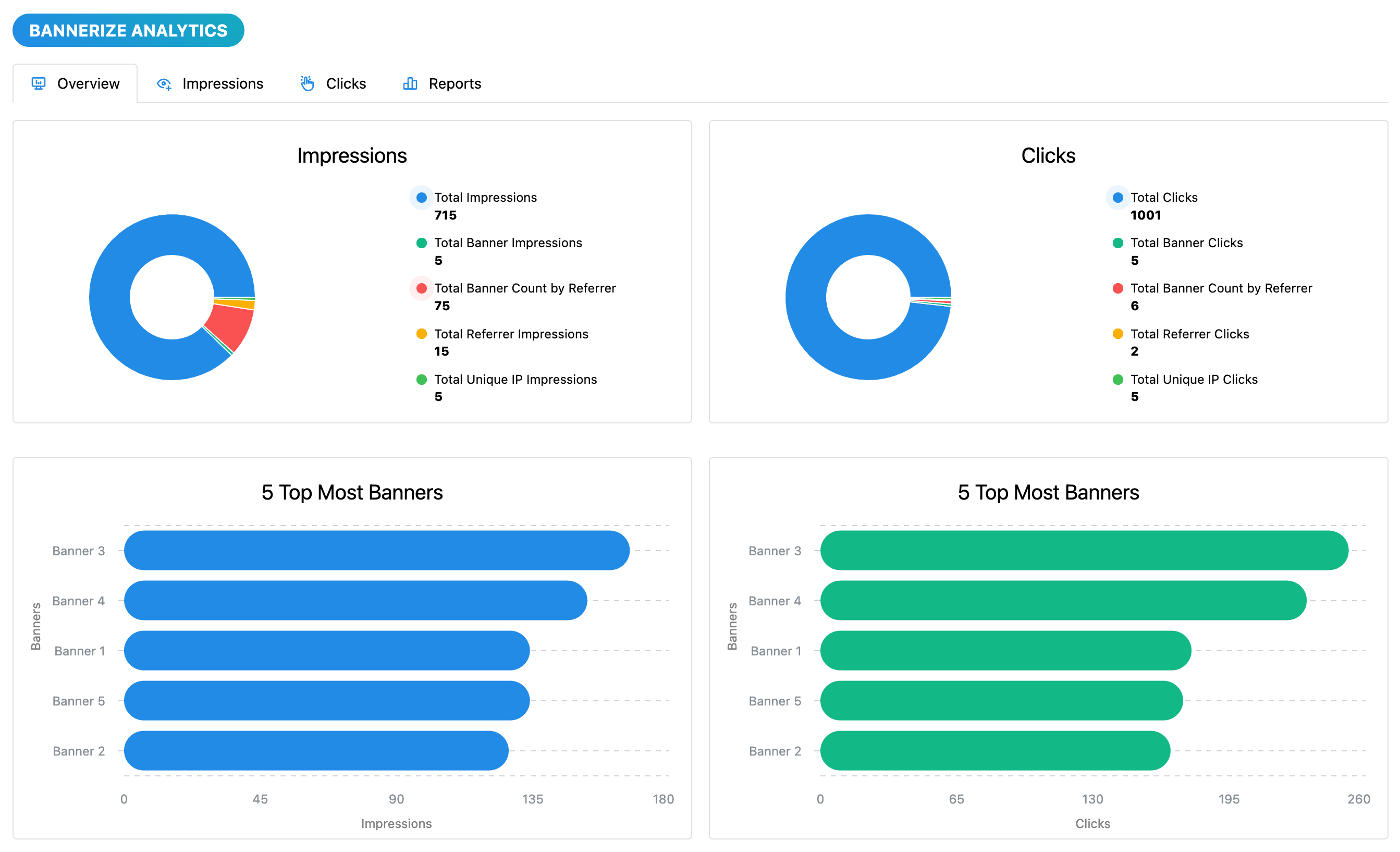
The Bannerize Analytics overview, unchanged in 2.0.0: impressions and clicks as two rings broken down by banner, referrer and unique IP, and below them the five most-shown and the five most-clicked banners
Scotty 2.2.0. Scotty is the maintenance plugin: cron, database clean-up, site settings. Its Run now button on the Cron page ran the job and quietly removed its recurring schedule, and the Scheduled Cron Jobs counter counted due times rather than jobs — 10 on screen where there were 12. Both are fixed; the admin also moved to Mantine 9, which needs a newer React than WordPress ships, so Scotty now carries its own.
wpbones.com · Bannerize on WordPress.org · Scotty
Netfox
Asking the devices that never speak (0.23.0, 0.23.1). Netfox found devices by listening, and a device that is switched on, quiet, and has never had a reason to talk to your Mac produced no signal at all — a printer asleep, a camera that only ever phones its own cloud. It was not hard to find; it was unreachable by construction. Now you can give Netfox a range and it asks each address one small question, and whatever answers joins the list you already have rather than a parallel one. The range stays inside your own subnet — one that reaches outside is refused rather than trimmed to fit — and it doubles as a filter, which is why the footer then shows both counts, 2 in range · 33 on the network: a filter you have forgotten looks exactly like a network that has lost thirty devices. This Mac’s Ports tab also names the process behind each open port and says whether closing it can be undone. On the machine it was measured on, only 2 of 36 running services were set to restart themselves, so a tool that said “it’ll come back” would have been wrong about the other 34.
Within hours, someone sent a screenshot from a Mac Studio on Ethernet and Wi-Fi at once: the sweep menu offered en0 and en1, both covering the same 254 addresses — two rows that did the same thing, in a vocabulary nobody uses. 0.23.1 shows one row per network, named the way macOS names the interface, in your language, and read from the system rather than guessed: on the laptop I wrote it on, en0 is Wi-Fi and en1 is Thunderbolt 1.
What a silence means (0.24.1, 0.26.0). A MySQL server had been stopped. The terminal said the port was closed. Netfox, open right beside it, still said Open. It was not wrong about what it had seen — it was wrong about when. 0.24.1 made the Ports list honest about its age: opening the tab re-checks every open port whose answer is more than a minute old, a line says how old the list is, and Full Scan now corrects what it finds instead of keeping only the ports it found open. The rule underneath is that a silence is not a close: no reply keeps the old reading, while a refusal is a real answer and is recorded at once.
Then the part I would rather tell you than not: that rule held on some paths and not on others. A scheduled scan that caught a device asleep rewrote every open port as Filtered — so an exposed Telnet port stopped counting as a risk, History logged the ports as closed, and when the device woke up, the next scan announced each of its services as newly opened. Nothing is what a firewall that drops packets sounds like; it is also exactly what a phone sounds like while it is asleep in a pocket. 0.26.0 keeps the answer through the silence, with the time it was given, and makes the menu bar, the notch, the Overview and Security share one verdict: OK means every device Netfox can reach has been scanned and none is at risk. Until now the menu bar could show a green OK before a single device had been scanned.
What are you called? (0.27.0, 0.28.0). You used to meet the same stranger three times: Apple, Inc., with a question mark for an icon — a Mac, an iPhone and an iPad, and nothing on screen to tell them apart. Plenty of devices never announce a name, and Netfox was only listening; 0.27.0 asks for the .local name, so that row now reads Annas MacBook Pro with a laptop icon, and the name is kept for up to 90 days while the device is off. 0.28.0 then lists each machine once: a Mac on a cable and on Wi-Fi at the same time used to show up twice, and two connections answering to the same name at the same moment — which only one machine can do — now fold into one row. Echo speakers are asked on the Alexa ports and named as such; makers that make many kinds of thing keep the question mark, because a wrong picture is worse than none. A test build had drawn two Belkin devices as smart plugs, and they were mesh repeaters.
The row that vanished with macOS 27 (0.22.1). Nobody wrote this bug. It arrived on the morning macOS 27 came out, in code that had been correct for years: the table that turns a Mac’s build number into a system name came up one row short, so every Mac that updated stopped showing what it runs — and a missing row is indistinguishable from a device that declined to answer. An old test had asserted that the next macOS was unknown, so on the day it shipped the test passed by agreeing with the bug. The new one asks the machine running the suite for its own build number, and goes red the first time anyone runs it on a macOS nobody has added a row for.
And how the numbers arrive (0.24.0, 0.25.0, 0.25.1). Help → Release Notes… now holds the whole history, newest first, offline and in your language — every release had notes in six languages inside the app, and you simply could not reach them. On macOS 26 and later the menu-bar panel and the Overview cards are glass, tinted in the colour of the tool each one opens, with the colour under the glass so it survives an inactive window, which is where a network monitor spends most of its life. Numbers roll in after a deliberate beat, cards land on a spring, a refresh presses each card instead of re-running the show, and on macOS 27 you can pull a view down to refresh it, as in Mail. With Reduce Motion on, nothing moves. And 0.27.0 swaps the old notes panel for the same small update card FinderGit got a day later.
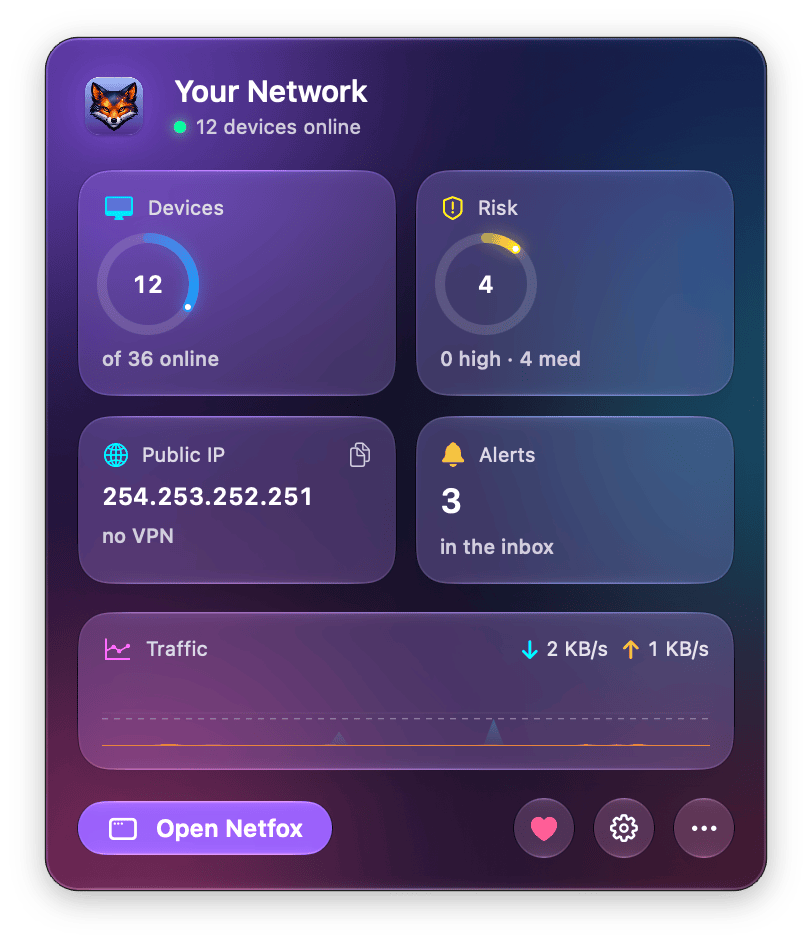
The Netfox menu-bar panel in glass: 12 of 36 devices online, a risk ring at 4 with 0 high and 4 medium, the public IP with no VPN, 3 alerts in the inbox and a traffic line, with the violet Open Netfox button at the foot
https://netfox.app
FinderGit
The tabs say what is waiting inside them (0.36.0, 0.37.0). Finding out what was open on a repository meant clicking Issues and counting, then Pull Requests and counting again. Repeat that across a folder of thirty repositories and you have spent a real minute on a question with a one-digit answer. The two tabs now carry their open count, and a tab with nothing open carries no number at all — Bitbucket’s Issues tab stays bare rather than claiming a zero nobody ever told it. The count costs nothing, because it is the one the file browser’s columns already had, and arrowing past a repository fetches nothing. Underneath was the bug this issue is about: a repository whose remote could not be read once — a lock file left behind by another git action is enough — was quietly written off for the rest of the session, counts and all, with no way to bring it back. Refresh now asks again. The next release gave every issue and pull request a second line saying who opened it and how long ago, because a title on its own does not tell you whether you are looking at something from this morning or something that has been sitting there since spring. It costs not a single extra request: the data arrived with the list, and was being thrown away.
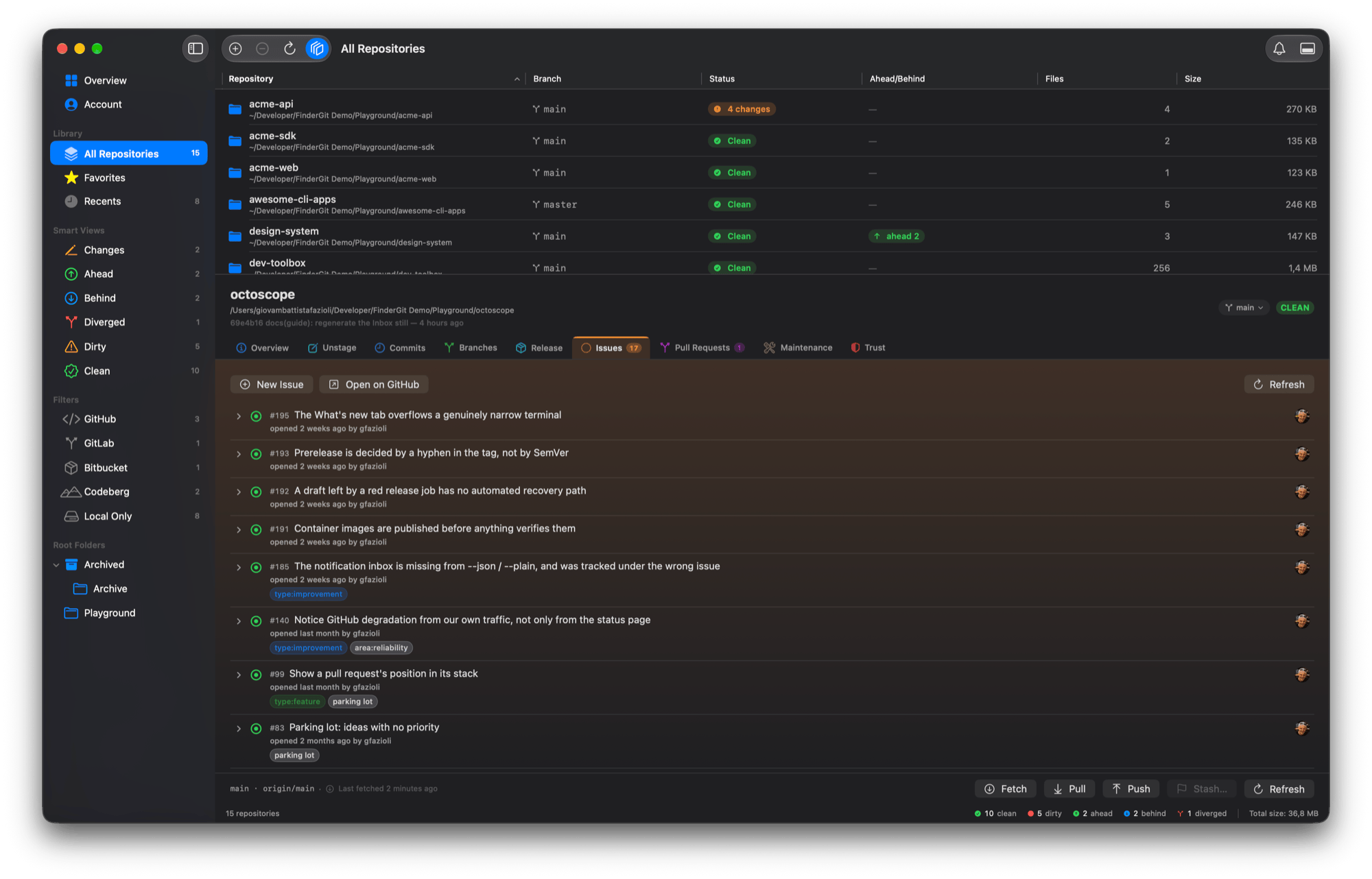
The FinderGit detail panel on a repository with open work: the Issues tab carries an orange badge reading 17 and Pull Requests a purple 1, the other seven tabs carry none, and every issue row says who opened it and how long ago
Branches, without the terminal (0.38.0). Create, rename, merge, rebase and delete, beside the listing and switching that have been there since 0.11.0. A remote branch offers only Merge — a push to a remote that usually belongs to somebody else has a different blast radius. The rebase confirmation says git will check out the branch being rebased before you agree, not after, and a delete git refuses offers the forced option in the same dialog rather than a dead end. Kaleidoscope gets a button beside Refresh Diff, drawn only if you have Kaleidoscope: a permanently greyed control advertising an app you have not bought tells you nothing you can act on. And twenty-eight count strings in Italian, French, German and Spanish had been reading as plurals at one.
Your own AI key, a whole changeset, and the file that made your repo heavy (0.39.0). Commit messages can now come from your own provider and key, kept in the macOS Keychain; the diff travels from your Mac straight to the service you picked, and a key that cannot be verified is saved unconfirmed, rather than claiming more than the app knows. Diff All sends staged and unstaged changes to Kaleidoscope as one changeset, and lists underneath whatever could not be sent, and why. And the one I have wanted for years: the twenty largest objects in a repository’s history, files deleted long ago included — with the rewrite offered as a runbook rather than a button. FinderGit never runs those commands itself.
Dashboards that arrive (0.40.0). The Overview and Account cards land one after another and their figures roll up; they are glass on macOS 26 and later, and on macOS 27 you can pull them down to refresh, as in Mail. With Reduce Motion on, nothing moves. After an update, a small card names the version, and Learn More… opens the Release Notes window, where a release’s unread dot now goes the moment you open it.
https://findergit.app
octoscope
Your activity, in the order it happened (0.35.0). octoscope has a quiet half — --json and --plain, the part you pipe into a status bar or a cron job — and until now it could tell you everything about your repositories and nothing about you. --activity changes that. One decision worth knowing if you build on it: when you do not ask for the feed, the recent_activity key is absent, not empty. An empty list would be a claim — we looked, there was nothing — and that claim would be false. A missing key lets a script tell did not fetch from nothing happened.
Wiring it in turned up the part nobody went looking for: the feed had never been in chronological order. 27 of 99 adjacent events came back out of sequence, then 28 in the next feed, then 25. The events endpoint is not documented as sorted, and it is not; octoscope had been trusting the order it was handed, so the Activity tab has been showing an almost sorted list for months — worse than an obviously unsorted one, because it reads as correct. It is sorted where events are parsed now, so the tab and the reports are fixed by the same change. The supply-chain scan also started reading the repository’s own settings: a workflow reacting to discussions, on a repository with discussions turned off, is not an exposure. That moves scores in both directions — fewer findings where settings make a trigger unreachable, more on private and internal repositories, where the axis used to stay quiet.
Someone to wait with (0.36.0). Every screen before the dashboard now opens with a small octopus and its periscope, drawn with the terminal’s own quadrant block characters and wearing your theme’s colours; once the dashboard is up, a smaller one stays beside the banner and looks around whenever a refresh runs. It moves on the spinner’s own ticks and stops when the spinner does, so it never adds a moment to the wait it keeps you company through. One honest caveat: a terminal font without those block characters shows boxes where the octopus should be.
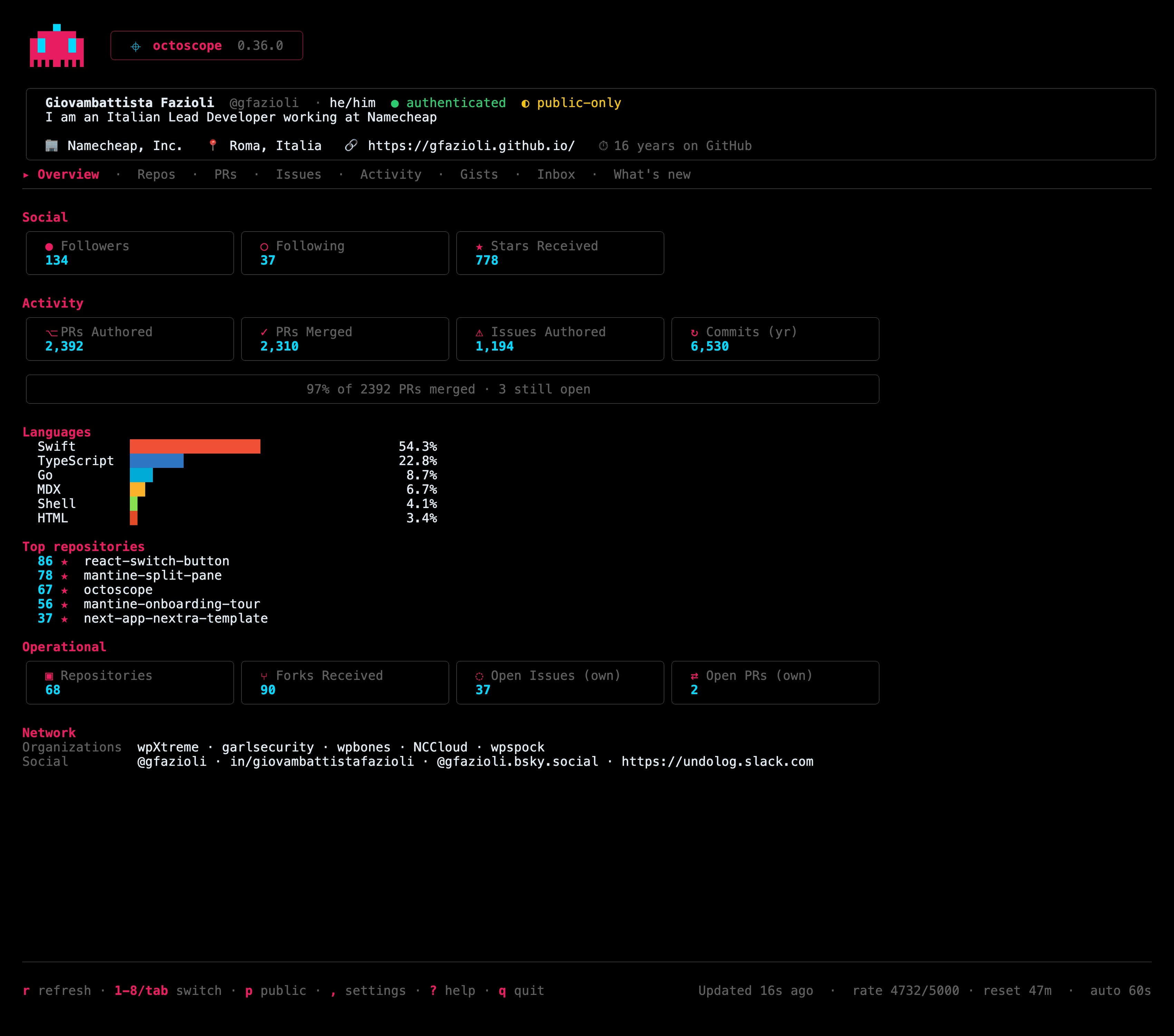
octoscope 0.36.0 on the Overview tab: the small octopus beside the banner, then the profile card, the social and activity counters, the languages bar and the top repositories, with the last refresh and the automatic interval in the footer
The less visible half of the release is about time. Pressing r used to leave the automatic refresh on its old schedule, so it could fire seconds after yours, asking GitHub for what you had just fetched — or, after a rate limit, spend one more request against a limit you had already hit. Now every answer from GitHub decides when the next automatic refresh runs, whoever asked for it. Measured against the real API with a 30-second interval: before, the automatic refresh went out 7 seconds after a manual one; now it goes out 30 seconds after. And the scan stopped mixing branches: a trigger found in one branch’s copy of a workflow was being scored together with a secret found in another branch’s copy of the same file, so two harmless files could add up to a score of 3 for a capability that existed on neither.
https://gfazioli.github.io/octoscope · brew upgrade gfazioli/tap/octoscope
Mantine extensions
A quiet fortnight by design: on the 29th all 26 components moved to Mantine 9.6.3 in one sweep — one patch each, nothing you have to do — and the two documentation templates moved with them. The one fix with a story is on the extensions site. In Firefox, hovering a card under All Extensions flooded the whole thumbnail with the BorderAnimate ring’s gradient instead of drawing the thin travelling ring; it was reported on Discord against Firefox 156, and the card now stacks one transform instead of three.
The Raycast extensions
One contribution this time, to Open Folders: a new Open Folders In preference decides where Finder shows a folder you open from the extension — a new window, as before, a new tab in the front Finder window, or the current tab. The new-tab mode has a catch worth stating up front: Finder’s scripting dictionary has no command for tabs, so the only way in is ⌘T through System Events, which needs Accessibility permission for Raycast — and the preference says so rather than failing quietly. When Finder cannot be scripted, the folder opens in a new window with a HUD explaining why.
Open Folders · raycast.com/Undolog
And on the site
gfazioli.github.io has a Lancetta card in the macOS section, the Italian page now tells search engines it is Italian, and switching language no longer makes the page jump 80 pixels. The React component libraries shipped nothing this fortnight; the last release of each still stands.
Undolog — open source studio. Every project in one place: gfazioli.github.io · this newsletter lives at undolog.com
FinderGit — a Git-aware file browser for macOS · findergit.app
Lancetta — a menu-bar monitor for the quotas of Codex and Claude Code · lancetta.app
Netfox — a network monitor for macOS · netfox.app
octoscope — a terminal dashboard for GitHub · gfazioli.github.io/octoscope
WP Bones — a Laravel-style framework for WordPress plugins, with Bannerize and Scotty built on it · wpbones.com
Mantine extensions — 26 components on npm · mantine-extensions.vercel.app
Raycast extensions — for the Raycast launcher · raycast.com/Undolog